
Exploring the Experienced Sims Mod in The Sims 4
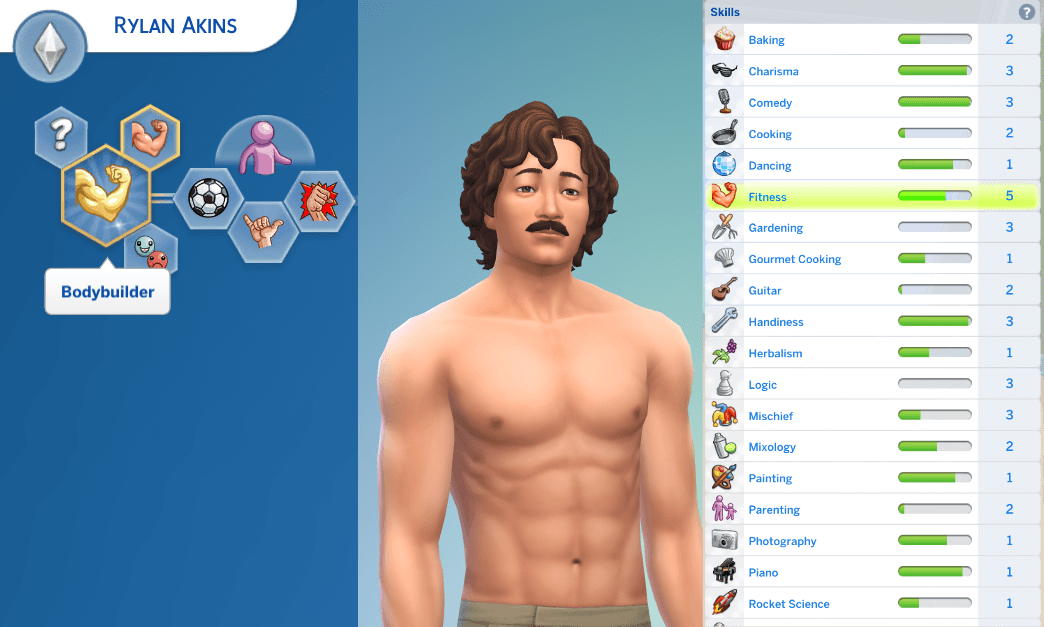
Starting a new household in The Sims 4 often confronts players with an immersion-breaking vanilla limitation: newly generated Young Adult, Adult, and Elder Sims start with completely blank skill levels. It strains narrative logic when an Adult Sim with a culinary career aspiration cannot cook basic scrambled eggs without burning the kitchen, or when a high-ranking corporate townie possesses zero charisma and logic. The Experienced Sims mod by scumbumbo/MTS community solves this longstanding gameplay flaw. Hosted on ModTheSims, this essential gameplay overhaul automatically distributes realistic baseline skills to newly generated characters, establishing itself as a vital addition to The Sims 4 custom content mod collections.
Rather than manually typing cheat codes for every newly moved-in Sim or newly spawned townie, the mod evaluates character age, traits, and background to award sensible beginning proficiencies.
Because the mod is completely base game compatible, simmers can enjoy authentic starting skills across all worlds without requiring specific expansion packs.
How the Skill Assignment System Operates
The technical architecture of Experienced Sims reflects deep understanding of game tuning scripts and life stage progression.
When a Sim spawns into the world—whether created in CAS, generated as an NPC neighbor, or aged up through rotational play—the mod runs an initial background assessment. It distributes skill points in fundamental competencies such as Cooking, Charisma, Fitness, Handiness, and Logic.
Age-Appropriate Skill Scaling
Skill distribution scales logically by life stage. A Young Adult Sim receives modest foundation skills reflecting high school graduation and early independent living. Adults receive deeper, career-relevant proficiencies reflecting years in the workforce. Elders receive seasoned expertise across hobbies, homemaking, and interpersonal skills, making them feel like genuine mentors to younger family members.
Trait Synergy and Organic Variety
The mod avoids giving every Sim identical skill layouts. It analyzes personality traits to inject organic specialization. An Art Lover Sim naturally starts with higher Painting or Photography competence, while an Active Sim enters the world with established Fitness ratings.
Live Mode Gameplay and Storytelling Benefits
Automatic skill distribution fundamentally improves daily gameplay flow and neighborhood vitality.
Believable Townies and Neighbors
When your active Sims visit local gyms, lounges, or community libraries, surrounding townies behave with authentic competence. Bartenders mix drinks smoothly, gym patrons maintain proper exercise form, and librarians engage in intellectual discussions rather than stumbling through novice animations.
Eliminating Tedious Setup Cheats
For legacy and rotational players who regularly move new spouses and roommates into active households, Experienced Sims saves hours of tedious console command typing. New family additions immediately feel like seasoned individuals with established life histories.
Installation Guidelines and Mod Compatibility
To install Experienced Sims, extract the .package and .ts4script files directly into your Documents\Electronic Arts\The Sims 4\Mods directory. Ensure that both custom content and script mods are enabled in your game options. The mod runs cleanly alongside popular story progression overhauls without conflicts.
Streamlining Mod Folder Management and Troubleshooting
Maintaining a large custom content collection in The Sims 4 can quickly become a complex logistical challenge. Between game patch updates, broken packages, conflicting tuning scripts, and corrupted cache files, players spend substantial time managing external files rather than actually enjoying the game.
Having dedicated tools designed to inspect, edit, and organize package files without launching the heavy game client saves countless hours of troubleshooting. Instead of enduring ten-minute loading screens just to identify a single broken clothing item or glitched chair, players can inspect package contents, preview 3D geometry, and verify texture maps directly in a lightweight external environment.
This efficiency transforms the modding experience from a stressful maintenance chore into a smooth, organized workflow, allowing players to curate their digital worlds with confidence and stability.
Empowering Creators and Translators in the Modding Community
Beyond personal mod folder organization, accessible tools play a pivotal role in empowering community creators, translators, and aspiring modders. Lowering the technical barrier to entry encourages more players to contribute custom content, localized translations, and gameplay enhancements.
When localization tools allow fast string editing and package reorganization without requiring complex programming environments, modders worldwide can collaborate easily to translate popular mods into multiple languages. This fosters a more inclusive, connected global Sims community where players can experience storytelling in their native language.
Whether you are an active creator polishing your latest CC release or a dedicated player translating your favorite gameplay overhaul for friends, streamlined utility tools form the backbone of modern Sims 4 customization.
Safe Modding Practices and Update Workflows
Every major game patch brings the possibility of outdated mods causing script errors or UI glitches. Having structured external tools simplifies the process of testing packages before placing them back into active save files.
By inspecting package resource IDs, tuning instances, and conflict logs externally, players can isolate broken content quickly without risking save file corruption. Establishing regular maintenance routines with reliable tools protects your gameplay progress and keeps your custom content collection healthy over years of play.
Cross-Platform Accessibility and Performance Benefits
A persistent obstacle for custom content enthusiasts has been operating system limitations. Traditional desktop utilities often required Windows operating systems with specific framework dependencies, leaving macOS, Linux, and mobile web users with few native options for mod auditing.
Browser-based modding utilities eliminate these operating system barriers. By leveraging web standard technologies, players can inspect packages, audit thumbnails, and organize content from any modern laptop or desktop setup. This universal accessibility empowers a much wider slice of the global player base to curate clean, stable custom content collections without wrestling with complex system installations.
Building Sustainable and Organized Mod Collections
Long-term enjoyment of modded gameplay relies heavily on keeping file hierarchies clean and organized. Over years of playing across multiple expansions, duplicate assets, conflicting overrides, and broken tuning files can accumulate unnoticed.
Utilizing dedicated web tools to audit package names, verify internal resource types, and inspect thumbnail assets before moving files into active Mods directories prevents clutter at the source. Players can establish structured subfolder hierarchies—such as categorizing by creator, content type, or gameplay pack—ensuring that patch day maintenance takes only minutes rather than hours of stressful file hunting.