What Random Hairstyles 2 Adds to The Sims 4
Hair is undeniably the most defining visual feature of any Sim in Create-a-Sim. Finding custom hairstyles that blend seamlessly with the official Maxis Match aesthetic while offering dependable technical execution is a constant search for community players. Many custom hair creators focus on dramatic, ultra-glossy Alpha hairs that require massive polycounts and clash with standard game graphics. Random Hairstyles 2 takes the opposite approach, providing clean, clay-sculpted hairstyles built on authentic base game textures. Hosted via sims4ccworld, this release pairs complete color fidelity with versatile styling potential, establishing itself as a trustworthy option in The Sims 4 custom content ecosystem.
The package is completely base game compatible, meaning you do not need expansions like Discover University, Eco Lifestyle, or Cottage Living to assign these hairstyles to your characters. The hair meshes install directly into your game and integrate naturally beside official EA catalog selections without requiring specialized graphical configuration.
When styling family households, having dependable everyday hair options is crucial. These hairstyles avoid extreme volume or overly complicated salon updos, delivering relaxed, believable looks that fit morning routines and casual neighborhood strolls effortlessly. They offer practical styling for characters who care about looking neat without spending two hours in front of a bathroom mirror.
Mesh Craftsmanship and Hair Sculpting
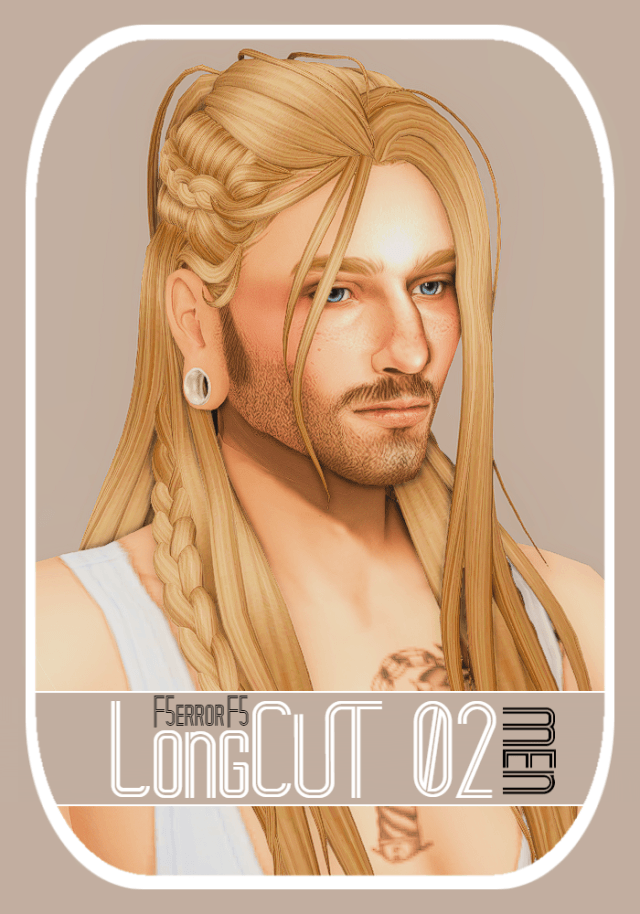
The 3D modeling across Random Hairstyles 2 demonstrates a strong grasp of Maxis Match styling rules. The strands are sculpted in smooth, distinct ribbons rather than wispy individual alpha planes, ensuring the hair retains volume without producing jagged edges or transparency glitches.
The strand separation provides subtle texture without cluttering the geometry. In CAS mode, moving the camera around the head reveals natural layering. The hair strands curl gently around the ears and nape of the neck, suggesting soft natural waves that hold their shape through daily activities.
Scalp Fit and Clavicle Weighting
One of the most frequent technical problems with custom hair is poor scalp alignment. Ill-fitting meshes often leave gaps along the hairline or clip directly through Sim ears when adjusting head shapes in CAS. The meshes in this set hug the skull contours snugly across diverse facial presets. The hairline transition looks natural, avoiding harsh, painted-on borders.
Around the shoulders and neck, vertex weights allow the hair to flex naturally with head rotations. When your Sim looks over their shoulder or tilts their head during conversation, the hair strands bend smoothly rather than jabbing rigid polygons into the collarbones. This flexibility preserves immersion during emotionally expressive interactions.
Hat Compatibility and Custom Meshes
Hat compatibility is often overlooked by casual custom content creators. When hat chops are missing, placing a beanie or baseball cap onto your Sim either completely flattens their hair into baldness or causes massive geometry tears through the hat crown. Random Hairstyles 2 includes fully functional hat-chopped meshes. When you equip winter beanies, sun hats, or baseball caps, the hair tucks neatly under the brim, maintaining realistic volume around the sides and neck.
Having proper hat support is particularly valuable for players using the Seasons expansion. Your Sims can bundle up for snowstorms in Mt. Komorebi without having to switch their signature hairstyle just to wear a winter knit cap.
Evaluating the EA Color Palette and Swatch Support
Nothing frustrates a player more than finding a gorgeous hairstyle mesh that only includes five arbitrary recolor swatches. Random Hairstyles 2 includes the full roster of official EA color swatches, covering every standard shade from deep natural blacks and rich browns to vibrant pastels and grey tones for elders.
Consistent Color Matching Across Households
Because the swatches match the official EA color palette precisely, family genetics remain intact across generations. Children inherit hair tones that perfectly coordinate with their parents’ swatches without odd tint shifts or mismatched brightness levels. The elder grey swatches feature subtle age-appropriate dimension without looking chalky.
The rainbow and pastel swatches—such as soft lilac, turquoise, and bubblegum pink—allow teenagers and creative Sims to experiment with alternative styles. The color tones stay faithful to EA defaults, meaning matching eyebrow CC and facial hair swatches coordinate flawlessly.
Texture Depth and Light Interaction
The specular maps applied to the hair meshes provide gentle, diffuse highlights rather than unnatural plastic glare. Under bright midday sun in Oasis Springs or the soft diffused lighting of Mt. Komorebi, the hair surfaces reflect light in soft gradients that harmonize with base game character skin tones. In dimly lit interiors, the hair retains its distinct form instead of turning into an unreadable dark mass.
Gameplay Versatility and Everyday Storytelling
Random Hairstyles 2 shines across diverse storytelling scenarios because of its grounded, unpretentious aesthetic.
Casual Everyday Routines
These styles work wonderfully for high school teenagers, university students, and busy working parents. They project an effortless, lived-in charm that suits characters making breakfast, studying at desks, or tending community gardens. Your Sims look like real people rather than staged runway models. They feel natural in suburban kitchens, neighborhood diners, and community libraries.
Athletic and Outdoor Activities
The compact silhouettes pair naturally with athletic and outdoor outfits. Whether your Sims are jogging along Windenburg canals, practicing yoga in San Myshuno parks, or hiking through Granite Falls trails, the hair looks practical and secure. It does not flop awkwardly across the face during strenuous physical exercise.
Installation and Mod Folder Advice
Installing Random Hairstyles 2 requires dropping the package file into your Documents\Electronic Arts\The Sims 4\Mods folder. With complete base game compatibility, all LOD models present, and full hat support, this release delivers dependable, glitch-free hair styling for all your save files. Keep it neatly categorized inside a hair subfolder for effortless management.
Lighting Behavior and Shading Across In-Game Worlds
One of the most revealing tests for any custom hair mesh in The Sims 4 is how its diffuse and specular textures respond to varying world lighting. Many creators author their textures under neutral, artificial studio lights, resulting in hair that looks gorgeous in CAS but turns unnaturally reflective or strangely washed out once loaded into live gameplay.
Under the direct, warm midday sunlight of Oasis Springs or Strangerville, the strand highlights maintain realistic contrast. The lighter tones do not burn out into blinding white glare, while darker brunette and black shades retain discernible strand separation rather than collapsing into flat, silhouette-like voids. Conversely, in overcast and moody environments like the rainy coastal districts of Brindleton Bay or the misty hills of Forgotten Hollow, the hair absorbs ambient shadows naturally, reflecting the subdued atmosphere without looking muddy or greyed out.
Indoors, the interaction with artificial point lights—such as ceiling fixtures, table lamps, and fireplaces—remains consistent. When your character relaxes near a crackling fireplace in a cozy winter cabin, the warm amber glow catches the hair contours with soft gradation, providing visual warmth during quiet family storytelling sessions.