
Exploring the Lost Touch Tattoo in The Sims 4
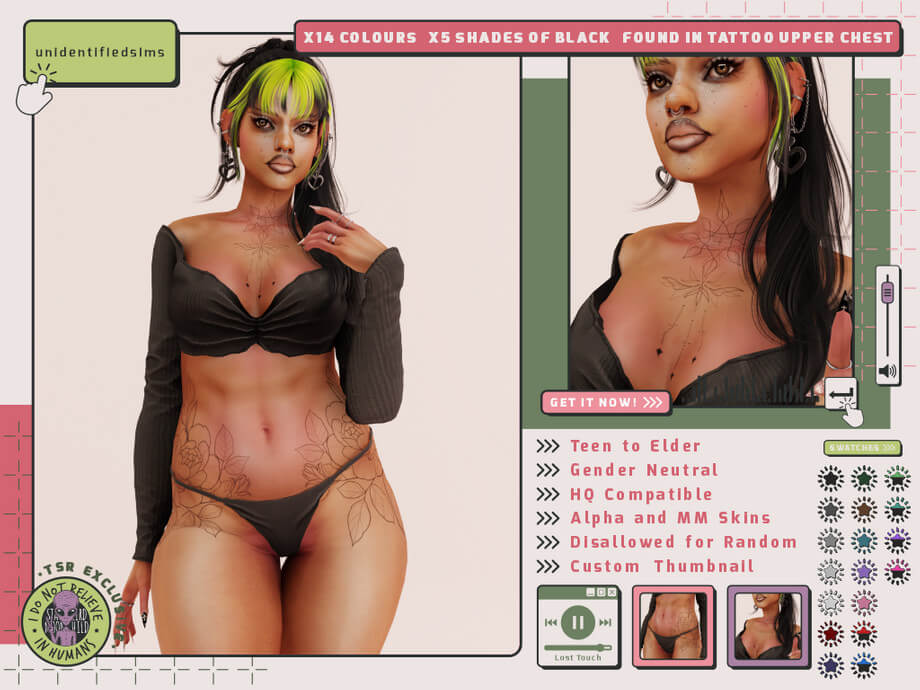
Tattoos in The Sims 4 frequently struggle with either low resolution or awkward bodily placement. Many official base game ink options appear pixelated when zoomed in, while third-party options often cater exclusively to hyper-realistic Alpha skins, looking like blurry photocopies when applied to standard Maxis Match characters. The Lost Touch Tattoo tackles these long-standing complaints by offering a versatile upper-chest ink piece crafted for both Alpha and Maxis Match aesthetics. With dedicated swatches and robust customization support, it stands out as an exemplary accessory in The Sims 4 custom content landscape.
Placed within the Upper Chest tattoo slot, this piece adds deliberate artistic expression without overwhelming your Sim’s entire torso. Whether your character is an underground musician, a rebellious college student, or simply someone who appreciates refined body art, this piece delivers nuanced visual impact that elevates character designs across generations.
Many players avoid tattoos altogether because base game selections feel either cartoonish or limited to random tribal shapes that feel disconnected from modern streetwear. Having a focused chest tattoo with nuanced shading bridges that gap, giving storytellers a credible tool for character visual development.
Technical Specifications and In-Game Features
From a technical standpoint, the Lost Touch Tattoo brings an impressive roster of player-friendly features that make it stand well above generic skin details found on file-sharing sites. The creator made several smart design decisions during package authoring that improve overall usability.
Broad Color Options and Nuanced Black Gradients
The package contains 14 total colors, including 5 distinct shades of black ink. That distinction between black tones is vital for realistic character creation. Fresh tattoos in real life carry a dark, saturated pigment, whereas older ink gradually fades into softened charcoals or muted blue-grey tones over time. Having five graded black options lets you represent aged, weathered ink on older Sims while saving sharp pitch-black swatches for newly inked young adults.
The remaining 9 colorways introduce artistic pigments for players who enjoy vibrant illustrative body art. Red ink variants look particularly striking on the chest, giving off traditional woodblock or dark gothic sensibilities without bleeding muddy edges into the underlying skin texture. Blue, green, and warm brown variations round out the palette, offering stylistic options for fantasy saves or alternative subculture styling.
HQ Mod Compatibility and Slider Integration
For players who push visual fidelity with the High Quality (HQ) texture mod, the Lost Touch Tattoo is fully HQ compatible. High-resolution texture maps preserve sharp linework even in extreme close-up shots during CAS portrait photography. Crucially, the tattoo also supports the in-game color and opacity slider mechanics, allowing you to fine-tune tint and transparency directly on your Sim’s skin tone.
Adjusting the opacity slider is especially helpful if you want ink to appear softer against very pale or very dark skin tones. Instead of being locked into a single contrast level, you can slide the opacity down by twenty percent to give the tattoo a softened, naturally settled appearance beneath the dermal layer.
Disallowed for Random and Custom Thumbnails
Nothing breaks immersion faster than elderly townies and random barista NPCs spawning on community lots covered in mismatched chest tattoos. The creator responsibly flagged this asset as disallowed for random. Randomly generated townies will not spawn wearing it, keeping your game world clean. In addition, a clear custom thumbnail inside the CAS tattoo catalog makes locating the item instantaneous, eliminating tedious hunting through dozens of generic EA icons.
That custom thumbnail preview saves noticeable frustration during character creation. Instead of clicking blindly through nameless icons hoping to find the exact chest piece you downloaded, you see the actual tattoo artwork rendered neatly inside the catalog square.
Compatibility Across Skin Styles and Age Groups
Versatility is the standout strength of the Lost Touch Tattoo. Rather than locking itself into a narrow aesthetic silo, it adapts to diverse player setups and life stages.
Maxis Match vs. Alpha Skin Blending
Finding custom tattoos that respect Maxis Match clay textures without looking cartoonish is notoriously difficult. The linework here strikes an ideal balance: crisp enough to remain legible against Alpha skins, yet organic enough to blend smoothly with standard base game diffuse maps. The ink settles into the skin layer naturally, avoiding the sticker-like appearance that plagues low-effort CC tattoos.
Even when paired with custom skin overlays, default skin replacements, or contour details, the tattoo diffuse map sits cleanly in the tattoo layer stack. It does not overwrite face details or body freckles, ensuring your Sim’s existing facial features remain completely intact.
Age Frames and Gender Neutrality
The asset is flagged as gender-neutral and covers Sims from Teen all the way to Elder. On masculine chests, the design flows along the pectorals and collarbones without warping around muscular morphs. On feminine frames, the tattoo curves gracefully across the upper sternum without distorting over varied bust presets. This structural adaptability means you can assign the piece across family members or romantic partners without running into awkward anatomical stretching.
For elderly Sims, pairing the faded black swatch with skin wrinkles creates an evocative visual history. It suggests a Sim who lived through adventurous youthful years, adding silent storytelling depth to grandparents in legacy gameplay.
Styling and Outfitting with Chest Tattoos
Because the tattoo occupies the upper chest zone, choosing appropriate tops determines how much ink shows during normal conversations. Open-collar shirts, deep V-necks, tank tops, and unbuttoned jackets reveal the central motifs attractively. When your Sim changes into formal wear or buttoned-up business attire, the collar conceals the piece naturally, providing a subtle contrast between public professional life and private self-expression.
In hot weather outfits, beach swimwear, or sleepwear, the full breadth of the ink becomes visible. Pair it with layered silver necklaces, minimalist piercings, and casual denim for an authentic indie aesthetic, or combine it with grunge accessories for an edgier look in urban neighborhoods like San Myshuno.
Practical Notes for CAS Catalog Management
Installing the tattoo is as simple as placing the `.package` file into your Mods folder. Because it does not modify default game tuning files or replace existing textures, it will not conflict with other body accessories or skin overlays. If you use multiple chest tattoos simultaneously, ensure they utilize separate CAS slots or body locations to avoid texture overlapping. The Lost Touch Tattoo occupies its designated slot cleanly, offering dependable stability across all game versions.