
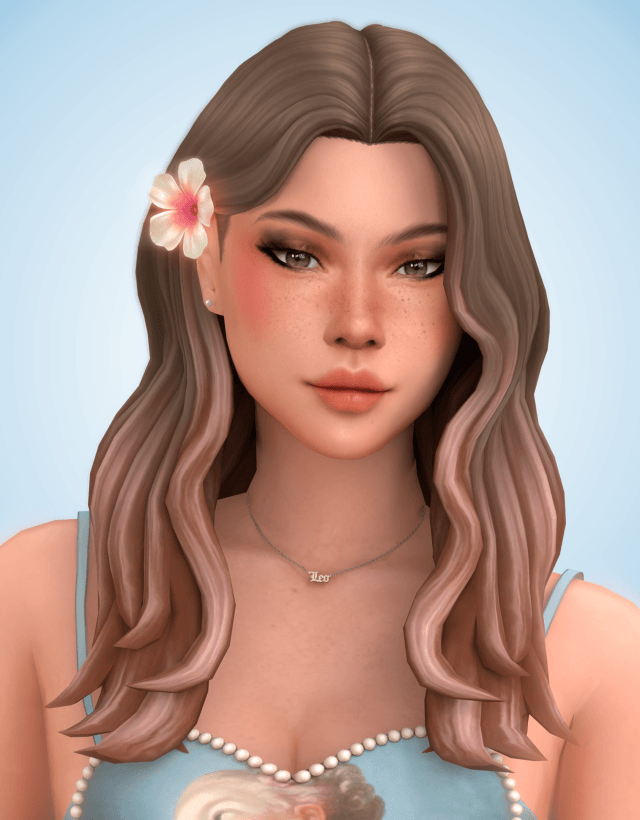
Introducing the Oceane Hair to The Sims 4
Gentle beach waves, soft natural movement, and tropical floral accessories bring effortless coastal charm to character aesthetics in The Sims 4. While the official catalog provides a few wavy hairstyles, they often feature chunky plastic geometry or lack the soft, airy bounce that makes beach waves so captivating. The Océane Hair arrives as a gorgeously sculpted wavy hairstyle complete with two distinct styling versions and an optional tropical flower accessory. Distributed via sims4ccworld, this romantic hair package adds breezy island beauty to The Sims 4 custom content hair collections.
The hairstyle features cascading waves that tumble past the shoulders, framing the face with soft feathered layers and a relaxed natural parting.
Because the creation is base game compatible, any player can download and enjoy this hairstyle without needing Island Living or any additional expansion packs.
Two Mesh Versions, Flower Accessory, and 24 EA Swatches
The craftsmanship behind the Oceane Hair showcases thoughtful versatility and technical polish.
The package provides two versions to suit diverse styling preferences: one featuring relaxed face-framing strands for a casual beach aesthetic, and a neater variation tailored for everyday and formal wear.
Tropical Flower Accessory
Included with the hair is a charming tropical flower accessory placed in the Hats category with 5 distinct floral swatches. Players can tuck a vibrant hibiscus or plumeria blossom behind their Sim’s ear, instantly transforming the look into an idyllic island fantasy.
24 EA Swatches and Ombre Compatibility
The hair comes in all 24 standard EA swatches, ranging from rich platinum and honey blondes to deep raven blacks, fiery auburns, and playful fashion tones. It also works seamlessly with the creator’s Dareen ombre accessory, allowing players to add custom color dips and gradient tips.
In-Game Performance and Hat Compatibility
Wavy medium-long hair requires precise weighting to look fluid and natural during daily Live Mode interactions.
Hat Compatibility Profile
Unlike many custom wavy hairstyles, the Oceane Hair is fully hat compatible. When Sims put on wide sun hats, fedoras, or winter beanies, the hair morphs cleanly beneath the brim without flattening or producing weird angular gaps.
Level of Detail (LOD) Optimization
The package contains complete Level of Detail (LOD) models. The waves retain clean visual silhouette from camera distances across large community lots, preventing framerate drops or sudden geometry pop-in during bustling beach gatherings.
Storytelling Ideas for Island and Everyday Saves
The romantic, breezy character of the Oceane Hair enriches varied gameplay storylines.
Sulani Marine Biologists and Beachcombers
Pair the hair and plumeria blossom with casual tank tops and shorts for Sims living an eco-conscious island lifestyle, studying marine life and watching ocean sunsets.
Boho Indie Artists and Musicians
Give free-spirited artists and acoustic guitarists in Tartosa or San Myshuno an effortlessly stylish, romantic wave that matches their relaxed bohemian lifestyle.
Installation Instructions for Your Mods Folder
To install the Oceane Hair and flower accessory, place the package files into your Documents\Electronic Arts\The Sims 4\Mods directory. Ensure that custom content and script mods are toggled active in your game options. The hairstyle is found under the Hair category in CAS, with the flower accessory under Hats.
Lighting Behavior and Shading Across In-Game Worlds
One of the most revealing tests for any custom hair mesh in The Sims 4 is how its diffuse and specular textures respond to varying world lighting. Many creators author their textures under neutral, artificial studio lights, resulting in hair that looks gorgeous in CAS but turns unnaturally reflective or strangely washed out once loaded into live gameplay.
Under the direct, warm midday sunlight of Oasis Springs or Strangerville, the strand highlights maintain realistic contrast. The lighter tones do not burn out into blinding white glare, while darker brunette and black shades retain discernible strand separation rather than collapsing into flat, silhouette-like voids. Conversely, in overcast and moody environments like the rainy coastal districts of Brindleton Bay or the misty hills of Forgotten Hollow, the hair absorbs ambient shadows naturally, reflecting the subdued atmosphere without looking muddy or greyed out.
Indoors, the interaction with artificial point lights—such as ceiling fixtures, table lamps, and fireplaces—remains consistent. When your character relaxes near a crackling fireplace in a cozy winter cabin, the warm amber glow catches the hair contours with soft gradation, providing visual warmth during quiet family storytelling sessions.
Rotational Gameplay and Generational Family Storytelling
In rotational saves where you manage multiple interconnected households across several generations, hairstyles play a vital role in establishing visual identity and personality progression. Having reliable, glitch-free hair assets allows you to reflect character growth as your Sims age from teens exploring high school trends into mature adults juggling careers and parenting.
Because the swatch distribution aligns cleanly with genetic inheritance rules, you can assign this style to a character and watch their children inherit corresponding natural shades without awkward genetic drift. An elder parent with salt-and-pepper hair can pass down rich brunette or blonde genes to their offspring, maintaining visual lineage throughout extensive family trees.
The versatility of the silhouette also means you can repurpose this style across distinct characters without feeling repetitive. A young artist living in a San Myshuno loft can wear it with casual bohemian accessories, while an ambitious executive climbing the corporate ladder in Newcrest can pair it with tailored business suits, giving each Sim a unique persona while utilizing the same dependable mesh.
Accessory Layering and Hair Placement in CAS
When styling complete character looks in Create-a-Sim, how a hairstyle interacts with accessories determines whether you can build nuanced, detailed outfits. Many custom hairstyles feature wide side volumes that clip awkwardly through earrings, glasses, or facial piercings.
This mesh maintains thoughtful clearance around the earlobes and temples. When you equip statement hoop earrings, delicate studs, or eyeglasses, the frames rest naturally against the face without piercing into the hair strands. Headbands and hairpins also layer with clean depth, giving players creative freedom to accessorize their characters for varied occasions.
The neck clearance also accommodates high-collar winter coats and chunky knit scarves without forcing the lower strands to jut out at unnatural angles, making it a dependable year-round asset for diverse weather conditions.