
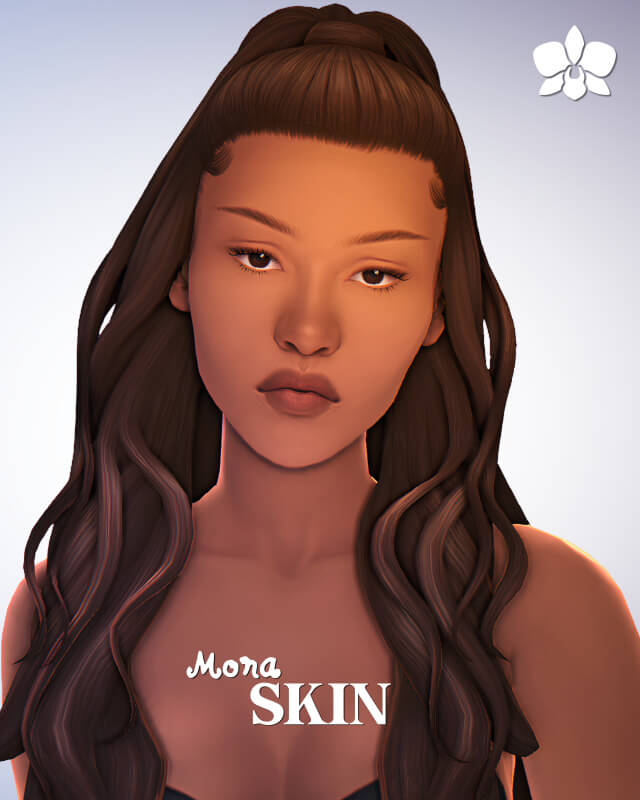
What the Mona Skin Brings to Character Creation
Skin details in The Sims 4 serve as the fundamental canvas for every character you build. The default EA skin textures often feel flat, plastic, and overly cartoonish, lacking the subtle anatomical definition, pore textures, and soft shadowing that make characters look genuinely alive. At the same time, heavy hyper-realistic alpha skins can look jarringly alien when placed into the stylized Sims 4 world. The Mona Skin overlay strikes a delicate balance between realism and Maxis Match aesthetic harmony. Hosted via sims4ccworld, this custom skin detail provides nuanced facial sculpting and full-body definition, making it an invaluable asset in The Sims 4 custom content community.
Because the Mona Skin is fully base game compatible, you do not need any game expansions to use it. It is tagged for Sims from Teen all the way to Elder, allowing you to maintain cohesive skin aesthetics across multiple generations of characters in your legacy saves.
Skin overlays offer immense convenience because they adapt to whatever default or custom skin tone you select. Rather than locking your Sim into a fixed color, an overlay acts as a semi-transparent filter that enhances underlying skin tones with realistic contours, highlights, and skin anatomy. This makes it a flexible tool for styling diverse casts of characters without managing dozens of separate tone packages.
Face-Only vs. Full-Body Overlay Options
One of the most practical features of the Mona Skin is that it is provided in two distinct wearing options: a Face Only version and a Full Body Overlay. This dual-format architecture gives players exact control over how the skin interacts with other custom content.
Face Only Version for Targeted Enhancements
If you already have specialized body tattoos, default body replacements, or unique torso skin details that you want to preserve, the Face Only version is ideal. It applies delicate lip definitions, eyelid folds, subtle nose bridge highlights, and soft cheekbone contouring without altering any body textures below the chin. This prevents unwanted texture conflicts or seam lines along the neck.
The facial detailing softens the default EA nasolabial folds while introducing gentle dermal texture. The nose bridge catches ambient light with soft realism, and the eye sockets receive subtle depth that makes characters look alert and expressive. In close-up conversation shots, Sims look refreshed and full of life.
Full Body Overlay for Complete Anatomical Harmony
When you want a unified aesthetic from head to toe, the Full Body Overlay provides comprehensive coverage. It adds subtle collarbone definition, gentle ribcage shading, and refined hand and foot textures. The body contours are understated: they do not force exaggerated muscular six-packs or unnatural hyper-toned curves onto every character, ensuring that varying body shapes look organic and believable.
The elbow and knee shading adds believable joint definition, which prevents limbs from looking like smooth plastic tubes during summer swimwear or athletic workouts. The overall anatomical balance feels grounded and respectful of varied body presets.
The 2 Included Swatches
The package includes 2 carefully tuned swatches that offer different opacity and contrast balances. One swatch provides a softer, diffused look ideal for delicate or younger Sims, while the second swatch offers slightly deeper contrast that highlights facial structure and bone contours more prominently. Both swatches blend effortlessly with the game’s color and opacity sliders.
In-Game Visual Quality and Lighting Behavior
Skin textures can look breathtaking in static CAS views only to look bizarre or blown-out once exposed to directional lighting in Live Mode. The Mona Skin performs admirably under varied lighting conditions.
Indoor and Outdoor Lighting Stability
Under the harsh midday desert sun of Strangerville or the soft overcast light of Brindleton Bay, the Mona Skin avoids blown-out white patches. The highlight map is subtle, preventing the greasy, shiny skin effect that ruins many Alpha skin overlays. Indoors under lamp lighting, the skin maintains warm, natural undertones without turning green or muddy.
The soft matte finish prevents harsh reflective glares when Sims stand near bright windows. The skin tone underneath remains true to your chosen swatch, avoiding unwanted hue discoloration.
Facial Animations and Expression Fidelity
When Sims smile, talk, laugh, or express anger, the skin textures flex naturally with facial rig bones. The mouth corners and eyebrow regions do not stretch into distorted pixel clouds, ensuring your Sims retain their emotional expressiveness during live storytelling and close-up photography.
Styling and Layering Recommendations
The Mona Skin serves as an outstanding base layer that coordinates seamlessly with a wide range of makeup and accessories.
Natural Everyday Looks
Because the skin overlay provides built-in lip contour and soft eye shading, you can leave Sims completely makeup-free while still having them look polished and refreshed. This is perfect for morning sleepwear outfits, athletic wear, or low-key family gameplay where heavy cosmetics would look out of place. It portrays natural beauty without tedious daily cosmetic application.
Glamour and Dramatic Cosmetics
When you do apply custom eyeshadows, eyeliners, and lipsticks, the smooth canvas of the Mona Skin allows the makeup pigments to pop cleanly. The nose and cheek highlights complement highlighters and blushes, creating professional portrait-ready looks for influencers, actors, or stylish partygoers.
Installation and Category Sorting
Installation is simple: place the package file into your Documents\Electronic Arts\The Sims 4\Mods directory. You can locate the Mona Skin under the Skin Details category in CAS. Because it does not modify core game tuning scripts, it is safe from post-patch breakages and runs smoothly on all computer setups.
Skin Blending and CAS Slider Interaction
Skin details and overlays must cooperate with the underlying character geometry rather than fighting against it. One of the greatest strengths of a well-crafted skin overlay is how smoothly it adapts to custom facial presets and the game’s built-in body sliders.
When adjusting cheekbone width, jawline depth, nose curvature, or eye tilt in Create-a-Sim, the overlay stretches and compresses proportionally with the underlying facial mesh. It does not cause jagged distortion around the mouth or nose bridge, allowing you to sculpt unique character faces while retaining crisp dermal definition.
The overlay also blends harmoniously with body sliders, whether your Sim has a slender build, muscular athletic definition, or a softer, full-figured frame. The shading along the collarbones, ribs, and midsection scales naturally, enhancing the character’s physical shape without imposing unnatural, painted-on proportions.
Layering with Makeup and Facial Accessories
Character creators often like to layer multiple details—such as custom freckles, blush, eyeliner, and piercings—to give their Sims distinct personal flair. A high-quality skin overlay acts as an ideal primer, providing a clean, subtle foundation that enhances rather than clashes with cosmetic accessories.
Because the overlay avoids overly aggressive default makeup shading, custom lipsticks and eyeshadows apply with true color fidelity. You do not get weird color bleeding or muddy edge artifacts around the lips or eyes. This compatibility makes it an essential tool for players who enjoy creating detailed character portraits and documenting subtle visual changes as characters age.