
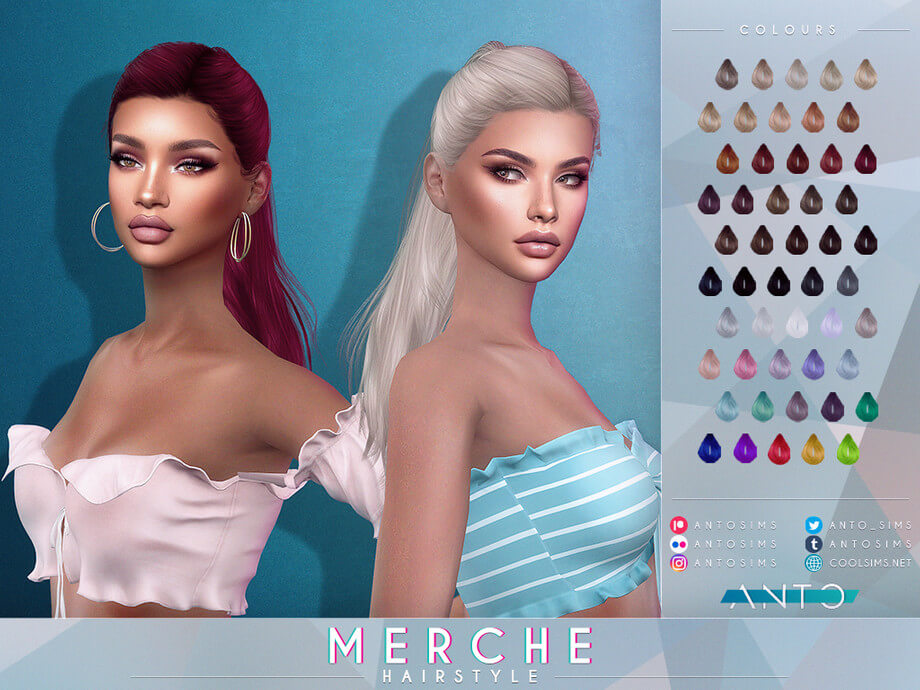
Exploring the Merche Hairstyle in The Sims 4
High-glamour ponytails remain among the most versatile hair assets for fashion-forward Sims. While the base game provides several basic pulled-back hairstyles, they frequently lack dramatic volume, refined hairline transitions, and sleek contouring. The Merche Hairstyle arrives as a high-fashion statement piece designed for feminine frames across Teen, Young Adult, Adult, and Elder life stages. Available through The Sims Resource, this custom hair combines a dramatic high side part with a cascade of sleek hair strands, establishing itself as a premier addition to The Sims 4 custom content hair collections.
The standout feature of this hairstyle is its sculpted high ponytail paired with an asymmetric side swoop across the forehead. The roots appear neatly brushed back, contouring around the crown before gathering securely into a dramatic wrapped band that elevates the ponytail high above the nape.
Whether styled for red carpet gala venues, upscale nightclub dates, or everyday influencer aesthetics, the silhouette delivers instant polish and undeniable presence.
3D Mesh Architecture, Alpha Strands, and Swatch Palette
The technical modeling behind the Merche Hairstyle showcases exceptional craftsmanship tailored for high-fashion character aesthetics.
The creator developed an intricate mesh that balances layered alpha hair strands with dependable game performance. The side part sweeps gracefully across the brow line without casting awkward shadow seams across the face. Individual strand cards gather neatly around the ponytail base, hiding hair ties naturally with wrapped hair geometry.
Dedicated Normal and Specular Maps
The package incorporates custom normal and specular maps that give every strand realistic depth and gloss. Under indoor salon lighting and bright outdoor sun, the ponytail catches directional highlights that accentuate individual hair layers rather than reflecting light as a flat plastic helmet.
Comprehensive Color Swatches
The hairstyle includes a comprehensive selection of hair swatches covering natural blondes, rich brunettes, deep raven blacks, and vivid fashion shades. Each swatch retains consistent shadow contrast, ensuring that lighter tones retain strand definition while darker colors maintain visible hair flow.
In-Game Animations and Hat Support Considerations
Long ponytail meshes require precise vertex weighting to remain visually cohesive during active movement.
Movement and Weighting Across CAS and Live Mode
In Live Mode, the ponytail flexes cleanly with neck turns, conversational gestures, and walking animations. Because the hair is gathered into a high tail, it avoids awkward chest clipping that frequently plagues open-shoulder long hairstyles. Sims can turn, dance, and run without the ponytail snapping or tearing at the nape.
Hat Compatibility Profile
Due to the high placement of the ponytail base and the structured volume around the crown, the hairstyle does not adapt to standard brimmed hats. However, it coordinates gorgeously with forehead tiaras, hairpin accessories, and large statement earrings placed in the earrings category.
Styling Ideas for High-Fashion and Formal Storylines
The dramatic flair of the Merche Hairstyle lends itself naturally to upscale character concepts.
Celebrity Red Carpet Entrances in Del Sol Valley
Pair the ponytail with an open-back designer gown, chandelier earrings, and smoky eye makeup for an award ceremony stroll down the Starlight Boulevard red carpet.
Chic Corporate Executives and Gallery Curators
Combine this polished updo with tailored blazers and high-waisted flared trousers to give ambitious career Sims an aura of commanding competence and effortless elegance.
Installation Guidelines and Mods Folder Setup
To install the Merche Hairstyle, transfer the package file into your Documents\Electronic Arts\The Sims 4\Mods directory. Ensure that custom content and script mods remain enabled within your game options menu. The file functions smoothly without requiring external meshes.
Lighting Behavior and Shading Across In-Game Worlds
One of the most revealing tests for any custom hair mesh in The Sims 4 is how its diffuse and specular textures respond to varying world lighting. Many creators author their textures under neutral, artificial studio lights, resulting in hair that looks gorgeous in CAS but turns unnaturally reflective or strangely washed out once loaded into live gameplay.
Under the direct, warm midday sunlight of Oasis Springs or Strangerville, the strand highlights maintain realistic contrast. The lighter tones do not burn out into blinding white glare, while darker brunette and black shades retain discernible strand separation rather than collapsing into flat, silhouette-like voids. Conversely, in overcast and moody environments like the rainy coastal districts of Brindleton Bay or the misty hills of Forgotten Hollow, the hair absorbs ambient shadows naturally, reflecting the subdued atmosphere without looking muddy or greyed out.
Indoors, the interaction with artificial point lights—such as ceiling fixtures, table lamps, and fireplaces—remains consistent. When your character relaxes near a crackling fireplace in a cozy winter cabin, the warm amber glow catches the hair contours with soft gradation, providing visual warmth during quiet family storytelling sessions.
Rotational Gameplay and Generational Family Storytelling
In rotational saves where you manage multiple interconnected households across several generations, hairstyles play a vital role in establishing visual identity and personality progression. Having reliable, glitch-free hair assets allows you to reflect character growth as your Sims age from teens exploring high school trends into mature adults juggling careers and parenting.
Because the swatch distribution aligns cleanly with genetic inheritance rules, you can assign this style to a character and watch their children inherit corresponding natural shades without awkward genetic drift. An elder parent with salt-and-pepper hair can pass down rich brunette or blonde genes to their offspring, maintaining visual lineage throughout extensive family trees.
The versatility of the silhouette also means you can repurpose this style across distinct characters without feeling repetitive. A young artist living in a San Myshuno loft can wear it with casual bohemian accessories, while an ambitious executive climbing the corporate ladder in Newcrest can pair it with tailored business suits, giving each Sim a unique persona while utilizing the same dependable mesh.
Accessory Layering and Hair Placement in CAS
When styling complete character looks in Create-a-Sim, how a hairstyle interacts with accessories determines whether you can build nuanced, detailed outfits. Many custom hairstyles feature wide side volumes that clip awkwardly through earrings, glasses, or facial piercings.
This mesh maintains thoughtful clearance around the earlobes and temples. When you equip statement hoop earrings, delicate studs, or eyeglasses, the frames rest naturally against the face without piercing into the hair strands. Headbands and hairpins also layer with clean depth, giving players creative freedom to accessorize their characters for varied occasions.
The neck clearance also accommodates high-collar winter coats and chunky knit scarves without forcing the lower strands to jut out at unnatural angles, making it a dependable year-round asset for diverse weather conditions.