
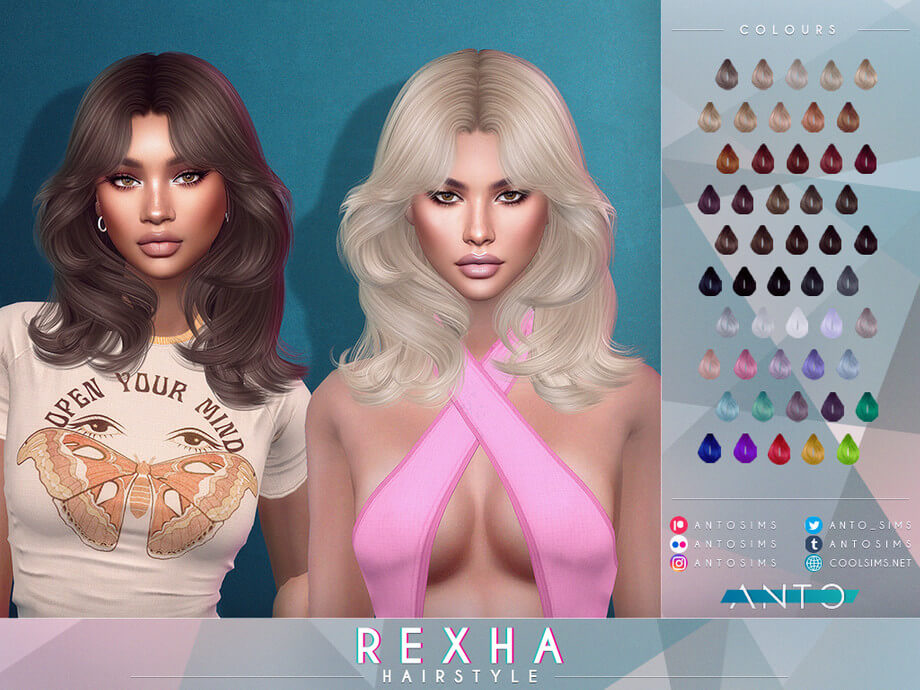
What the Rexha Hairstyle Brings to The Sims 4
Shoulder-length bobs and mid-length cuts with full volume are among the most versatile hairstyles in Create-a-Sim. When executed well, they offer effortless sophistication that transitions seamlessly from casual daytime errands to formal red-carpet events. However, middle-parted hairstyles in The Sims 4 often suffer from flat, lifeless roots that make the skull look unnaturally small. The Rexha Hairstyle hosted on The Sims Resource solves this by introducing glamorous root lift and voluminous, cascading waves that fall gracefully around the shoulders. Combining Maxis Match clay textures with modern pop-star glamour, this release stands out in The Sims 4 custom content hair collections.
Because the hairstyle is base game compatible, players do not need any game expansions to equip it. Tagged for feminine physical frames across Teen to Elder life stages, it provides an adaptable, confident styling option that elevates characters across all walks of life.
The defined middle part frames the face symmetrically while the lifted roots give the hair luxurious volume, making it an immediate favorite for stylish Simmers.
Mesh Sculpting, Root Volume, and Shoulder Rigging
The 3D modeling across the Rexha Hairstyle demonstrates exceptional balance between dramatic volume and clean polygon management.
The crown of the hair features lifted roots that contour the skull naturally without appearing like an oversized helmet. The middle part is clean and organic, blending smoothly with the forehead without harsh painted-on lines. The waves fall around the cheekbones and collarbones with soft, dimensional layering.
Scalp Fit and Neckline Clearance
The mesh hugs the forehead and temples snugly, eliminating the awkward gap lines that ruin many third-party hair releases. Around the shoulders and upper back, vertex weights are painted smoothly. When your Sim speaks, laughs, or turns their head, the hair strands bend naturally with the armature rather than jabbing sharp polygon corners through the collarbones.
Hat Compatibility and Custom Thumbnail
The creator included dedicated hat-chopped geometry. When your Sim equips winter beanies, sun hats, or berets, the top of the hair adjusts neatly beneath the brim while the voluminous waves cascade around the neck. A custom thumbnail is embedded in the package file for instant catalog recognition.
Color Swatches and Genetic Consistency
The package includes a comprehensive range of swatches matching the official EA color palette.
Natural Tones for Generational Gameplay
The natural swatches—including jet blacks, warm chocolates, golden blondes, and fiery auburns—feature soft, diffuse highlights that blend with the Sims 4 lighting engine. Family genetics pass down cleanly to children without strange tint mismatches, preserving visual continuity across generations.
Elder Swatches for Elegant Mature Sims
The grey and silver swatches offer dignified styling options for mature and elder Sims. The salt-and-pepper highlights give grandmothers and senior characters a regal, refined appearance that looks stunning during family holiday gatherings.
Styling Ideas for Everyday and Formal Looks
The Rexha Hairstyle adapts effortlessly across diverse lifestyle themes.
Pop Star Glamour and Red Carpet Events
Pair this voluminous style with dramatic evening gowns, diamond earrings, and bold makeup for celebrity galas in Del Sol Valley. It projects star power and high-fashion confidence that commands attention.
Urban Chic and Business Casual
Style the hair with a tailored blazer, turtleneck, and sleek trousers for an ambitious executive in San Myshuno. The clean middle part communicates professional authority while maintaining modern glamour.
Installation Overview
To install the Rexha Hairstyle, place the package file into your Documents\Electronic Arts\The Sims 4\Mods directory. With full base game compatibility, hat support, and stable rigging, this hairstyle is a must-have upgrade for your CAS catalog.
Lighting Behavior and Shading Across In-Game Worlds
One of the most revealing tests for any custom hair mesh in The Sims 4 is how its diffuse and specular textures respond to varying world lighting. Many creators author their textures under neutral, artificial studio lights, resulting in hair that looks gorgeous in CAS but turns unnaturally reflective or strangely washed out once loaded into live gameplay.
Under the direct, warm midday sunlight of Oasis Springs or Strangerville, the strand highlights maintain realistic contrast. The lighter tones do not burn out into blinding white glare, while darker brunette and black shades retain discernible strand separation rather than collapsing into flat, silhouette-like voids. Conversely, in overcast and moody environments like the rainy coastal districts of Brindleton Bay or the misty hills of Forgotten Hollow, the hair absorbs ambient shadows naturally, reflecting the subdued atmosphere without looking muddy or greyed out.
Indoors, the interaction with artificial point lights—such as ceiling fixtures, table lamps, and fireplaces—remains consistent. When your character relaxes near a crackling fireplace in a cozy winter cabin, the warm amber glow catches the hair contours with soft gradation, providing visual warmth during quiet family storytelling sessions.
Rotational Gameplay and Generational Family Storytelling
In rotational saves where you manage multiple interconnected households across several generations, hairstyles play a vital role in establishing visual identity and personality progression. Having reliable, glitch-free hair assets allows you to reflect character growth as your Sims age from teens exploring high school trends into mature adults juggling careers and parenting.
Because the swatch distribution aligns cleanly with genetic inheritance rules, you can assign this style to a character and watch their children inherit corresponding natural shades without awkward genetic drift. An elder parent with salt-and-pepper hair can pass down rich brunette or blonde genes to their offspring, maintaining visual lineage throughout extensive family trees.
The versatility of the silhouette also means you can repurpose this style across distinct characters without feeling repetitive. A young artist living in a San Myshuno loft can wear it with casual bohemian accessories, while an ambitious executive climbing the corporate ladder in Newcrest can pair it with tailored business suits, giving each Sim a unique persona while utilizing the same dependable mesh.
Accessory Layering and Hair Placement in CAS
When styling complete character looks in Create-a-Sim, how a hairstyle interacts with accessories determines whether you can build nuanced, detailed outfits. Many custom hairstyles feature wide side volumes that clip awkwardly through earrings, glasses, or facial piercings.
This mesh maintains thoughtful clearance around the earlobes and temples. When you equip statement hoop earrings, delicate studs, or eyeglasses, the frames rest naturally against the face without piercing into the hair strands. Headbands and hairpins also layer with clean depth, giving players creative freedom to accessorize their characters for varied occasions.
The neck clearance also accommodates high-collar winter coats and chunky knit scarves without forcing the lower strands to jut out at unnatural angles, making it a dependable year-round asset for diverse weather conditions.