
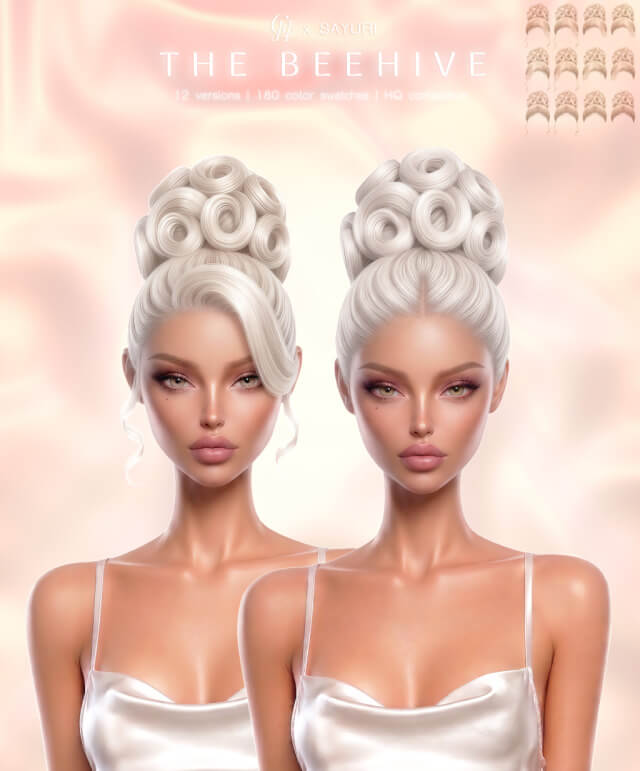
Exploring The Beehive Hairstyle in The Sims 4
Dramatic retro volume, sculpted bouffants, and iconic mid-century silhouettes bring unforgettable vintage glamour to character styling in The Sims 4. While the official catalog provides vintage options in retro packs, players frequently look for classic 1960s beehive updos that capture the towering height and refined symmetry of vintage salon photography. The Beehive Hairstyle arrives as a magnificent vintage updo sculpted for feminine Sims across Teen, Young Adult, Adult, and Elder life stages. Shared via sims4ccworld, this hairpiece introduces iconic mid-century elegance into The Sims 4 custom content hair collections.
The hairstyle features a towering teased crown that sweeps smoothly upward and wraps into a neat chignon, framed by sleek side sweeps and soft temple framing.
Because the creation is base game compatible, players do not need vintage stuff packs to style their Sims with this retro hair masterpiece.
3D Mesh Architecture, Vintage Volume, and 24 Swatches
The technical modeling behind The Beehive Hairstyle demonstrates high-level mesh sculpting and silhouette balance.
The creator modeled the voluminous crown with balanced curves, avoiding awkward angular edges that often spoil retro bouffant meshes. The hairline transitions softly into the forehead, allowing the teased volume to look intentional and professionally styled.
Custom Normal and Specular Maps
Integrated normal and specular maps highlight smooth brushed hair layers along the crown. Under indoor ballroom chandeliers or retro diner neon signs, the hair catches soft dimensional highlights that accentuate its structural contours.
24 Versatile Swatches
With 24 swatches available, the package spans platinum blondes, rich honey tones, jet raven blacks, warm chestnuts, and fiery vintage ginger tones, alongside stylish greys that make elder matriarchs look exceptionally distinguished.
In-Game Animations and Hat Compatibility Profile
Towering updo hairstyles present unique technical demands during live gameplay.
Full Hat Compatibility
Remarkably for a towering bouffant style, The Beehive Hairstyle is fully hat compatible. When Sims wear pillbox hats, vintage fascinators, or sun hats, the crown morphs cleanly beneath the brim while preserving the elegant swept sides and neck bun.
HQ Compatibility and Full LODs
The hair is fully HQ compatible, offering crisp texture clarity on high-end graphic settings. Full Level of Detail (LOD) models ensure that zoomed-out party venues maintain smooth framerates without visual pop-in.
Storytelling Ideas for Vintage and Retro Gameplay
The unmistakable silhouette of the beehive updo enriches diverse thematic gameplay narratives.
Mid-Century Decade Challenges
Bring authentic 1960s atmosphere to your historical decade challenge saves, dressing suburban homemakers and mod fashionistas in winged eyeliner and floral swing dresses.
Old Hollywood Red Carpet Icons
Outfit glamorous movie starlets and lounge singers in Del Sol Valley with towering bouffants, diamond drop earrings, and sleek velvet evening gowns for gala premiere events.
Installation Guidelines for Your Mods Folder
To install The Beehive Hairstyle, place the package file into your Documents\Electronic Arts\The Sims 4\Mods directory. Verify that custom content is toggled active in your game options. The hair appears cleanly indexed under Updos in CAS.
Lighting Behavior and Shading Across In-Game Worlds
One of the most revealing tests for any custom hair mesh in The Sims 4 is how its diffuse and specular textures respond to varying world lighting. Many creators author their textures under neutral, artificial studio lights, resulting in hair that looks gorgeous in CAS but turns unnaturally reflective or strangely washed out once loaded into live gameplay.
Under the direct, warm midday sunlight of Oasis Springs or Strangerville, the strand highlights maintain realistic contrast. The lighter tones do not burn out into blinding white glare, while darker brunette and black shades retain discernible strand separation rather than collapsing into flat, silhouette-like voids. Conversely, in overcast and moody environments like the rainy coastal districts of Brindleton Bay or the misty hills of Forgotten Hollow, the hair absorbs ambient shadows naturally, reflecting the subdued atmosphere without looking muddy or greyed out.
Indoors, the interaction with artificial point lights—such as ceiling fixtures, table lamps, and fireplaces—remains consistent. When your character relaxes near a crackling fireplace in a cozy winter cabin, the warm amber glow catches the hair contours with soft gradation, providing visual warmth during quiet family storytelling sessions.
Rotational Gameplay and Generational Family Storytelling
In rotational saves where you manage multiple interconnected households across several generations, hairstyles play a vital role in establishing visual identity and personality progression. Having reliable, glitch-free hair assets allows you to reflect character growth as your Sims age from teens exploring high school trends into mature adults juggling careers and parenting.
Because the swatch distribution aligns cleanly with genetic inheritance rules, you can assign this style to a character and watch their children inherit corresponding natural shades without awkward genetic drift. An elder parent with salt-and-pepper hair can pass down rich brunette or blonde genes to their offspring, maintaining visual lineage throughout extensive family trees.
The versatility of the silhouette also means you can repurpose this style across distinct characters without feeling repetitive. A young artist living in a San Myshuno loft can wear it with casual bohemian accessories, while an ambitious executive climbing the corporate ladder in Newcrest can pair it with tailored business suits, giving each Sim a unique persona while utilizing the same dependable mesh.
Accessory Layering and Hair Placement in CAS
When styling complete character looks in Create-a-Sim, how a hairstyle interacts with accessories determines whether you can build nuanced, detailed outfits. Many custom hairstyles feature wide side volumes that clip awkwardly through earrings, glasses, or facial piercings.
This mesh maintains thoughtful clearance around the earlobes and temples. When you equip statement hoop earrings, delicate studs, or eyeglasses, the frames rest naturally against the face without piercing into the hair strands. Headbands and hairpins also layer with clean depth, giving players creative freedom to accessorize their characters for varied occasions.
The neck clearance also accommodates high-collar winter coats and chunky knit scarves without forcing the lower strands to jut out at unnatural angles, making it a dependable year-round asset for diverse weather conditions.
Community Screen Photography and Cinematic Posing
For virtual photographers and content creators who capture close-up character portraits, hair assets face intense scrutiny under custom camera angles. Alpha and clay hair can often break apart or show hollow geometry when frozen in mid-animation poses.
This hairstyle maintains solid geometric volume across all angles. Whether your character is captured mid-stride along the waterfront or posed dramatically in a photo studio setup, the silhouette holds up cleanly without exposing internal mesh gaps or disjointed hair layers, providing stunning results for your story albums.