What Is the Belaloallure Dirge CC Collection?
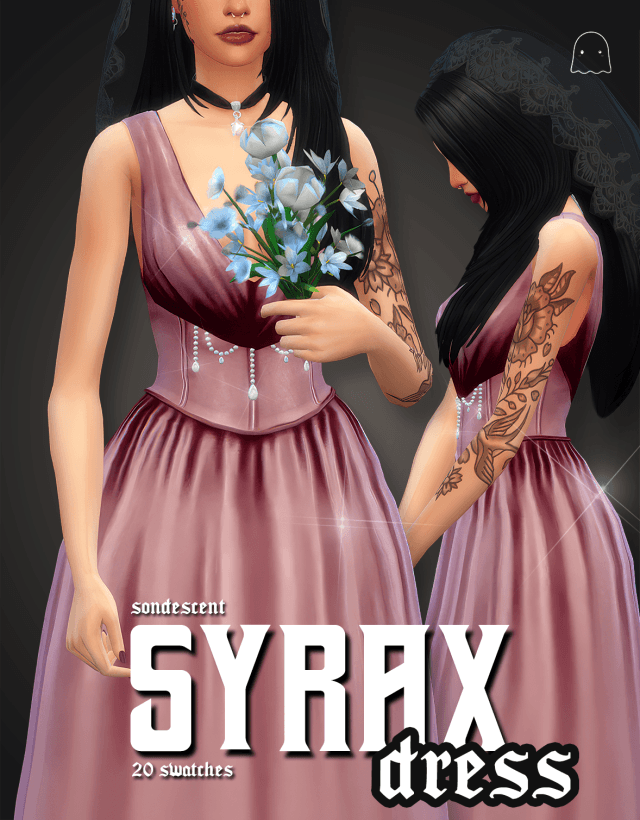
The Belaloallure Dirge Collection is a fashion-focused custom content release for The Sims 4 inspired by gothic elegance, Victorian mourning gowns, dark fairytales, and Halloween.
The creator describes the collection as a world where gothic sophistication meets spooky seduction.
This concept brings together several recognizable fashion influences.
Victorian mourning clothing provides the historical foundation, while dark fairytale imagery adds a mysterious and imaginative atmosphere. Halloween-inspired styling introduces another layer of theatricality, making the collection suitable for characters who embrace dramatic fashion.
Rather than focusing on casual clothing, the Dirge Collection celebrates expressive outfits that can help establish a Sim's personality.
Its visual direction is particularly appealing for players who enjoy supernatural households, historical-inspired storytelling, and gothic character customization.
Belaloallure Dirge Collection Features
Beyond its distinctive fashion concept, the Dirge Collection includes several technical features that are important when choosing Sims 4 custom content.
According to the creator's release notes, the collection includes:
- New Mesh: The custom content uses newly created mesh assets.
- All LODs: The items include multiple levels of detail for different viewing distances.
- Custom Thumbnails: Custom preview images help identify the content in Create-a-Sim.
- HQ Compatible: The collection supports compatible high-quality texture configurations.
These features demonstrate that the release includes more than a simple recolor of existing clothing.
However, the supplied release information does not specify the exact number of clothing items, available color swatches, supported life stages, or required game packs.
Players should check the original download post for those details before installing.
Victorian Mourning Fashion: The Inspiration Behind Dirge
One of the most distinctive aspects of the Belaloallure Dirge Collection is its inspiration from Victorian mourning clothing.
During the Victorian era, mourning attire was closely connected to social customs surrounding death and remembrance.
Black clothing became strongly associated with mourning, particularly during periods of formal bereavement.
The clothing worn during these periods could include elaborate gowns, carefully constructed silhouettes, and decorative details that reflected contemporary fashion.
Modern gothic designers frequently draw inspiration from these historical traditions.
The Dirge Collection follows a similar creative direction by incorporating the atmosphere of Victorian mourning fashion into a contemporary Sims 4 clothing concept.
Why Victorian Fashion Works So Well With Gothic Style
Victorian fashion and gothic aesthetics share several recognizable visual characteristics.
Both can emphasize dramatic silhouettes, decorative detailing, and an atmosphere of mystery.
Victorian-inspired clothing also works naturally in settings involving historic mansions, candlelit rooms, and elaborate interiors.
In The Sims 4, these visual elements can help establish a character's background without requiring lengthy explanations.
A Sim dressed in mourning-inspired fashion might appear to belong to an aristocratic family, a mysterious historical household, or a supernatural world.
The Dirge Collection allows players to explore these ideas through clothing.
Dark Fairytales and Halloween Inspiration
Victorian mourning fashion is only one part of the Dirge Collection's identity.
The creator also draws inspiration from dark fairytales and the mysterious atmosphere of Halloween.
Dark fairytales often reinterpret familiar fantasy themes through more dramatic, unsettling, or mysterious imagery.
Instead of bright magical kingdoms and cheerful characters, these stories may feature enchanted forests, abandoned castles, mysterious strangers, and supernatural events.
This aesthetic translates naturally into The Sims 4.
Players can create characters who appear to belong to a forgotten kingdom, an ancient family, or a world shaped by magic and secrets.
Creating a Dark Fairytale Character
To create a dark fairytale-inspired Sim, begin with a gothic outfit from the Dirge Collection.
Build the rest of the character around the clothing's visual direction.
Dark makeup, elegant hairstyles, and carefully selected accessories can help reinforce the mysterious atmosphere.
Consider using restrained jewelry rather than adding too many decorative elements.
A dramatic outfit often looks more sophisticated when the surrounding accessories remain relatively simple.
For additional Victorian-inspired fashion ideas, explore our SENTATE Banshee Collection for The Sims 4, another custom content release that combines romantic historical influences with gothic styling.
New Mesh: What Does It Mean?
The Belaloallure Dirge Collection includes new meshes.
In The Sims 4 custom content terminology, a mesh is the three-dimensional structure that determines the shape of an item.
Clothing meshes define how garments appear on a Sim's body.
They influence the overall silhouette, construction, and shape of the clothing.
A new mesh means the creator has produced a new model rather than simply changing the color or texture of an existing item.
This can provide greater freedom when designing distinctive clothing.
For a collection inspired by Victorian mourning gowns and gothic fashion, custom meshes are particularly relevant because historical-inspired silhouettes may differ significantly from the game's standard clothing.
However, new meshes do not automatically guarantee that every outfit will fit perfectly with all accessories or body presets.
Players should still test their preferred combinations in Create-a-Sim.
All LODs: Why Levels of Detail Matter
Another important technical feature is support for all LODs.
LOD stands for Level of Detail.
The Sims 4 uses different levels of detail to manage how objects and characters are displayed at varying distances.
When a Sim is close to the camera, the game can display a more detailed model.
At greater distances, a lower-detail version may be used to reduce rendering demands.
Custom clothing that includes the expected LOD levels is designed to accommodate these changes.
This is particularly useful for players who frequently switch between close-up screenshots and normal gameplay views.
Does All LOD Support Improve Performance?
Including multiple LODs can help clothing work with the game's distance-based rendering system.
However, actual performance depends on several factors, including mesh complexity, texture resolution, graphics settings, and the number of custom content items installed.
All LOD support should therefore be viewed as a useful technical feature rather than a guarantee of improved frame rates.
For players with large custom content collections, maintaining an organized Mods folder and checking the quality of installed assets can help reduce troubleshooting difficulties.
Custom Thumbnails for Easier Create-a-Sim Navigation
The Dirge Collection also includes custom thumbnails.
Thumbnails are the preview images displayed when browsing clothing and other items in Create-a-Sim.
Custom thumbnails can make it easier to recognize downloaded content, especially when players have hundreds or thousands of installed items.
Instead of searching through numerous similar-looking previews, players may be able to identify the collection more quickly.
This feature is especially helpful for players who organize outfits around specific creators or fashion themes.
For example, if you're creating an entire gothic household, recognizable thumbnails can make it easier to locate the appropriate clothing.
Custom thumbnails do not change gameplay mechanics, but they can improve the overall customization experience.
HQ Compatibility Explained
The Belaloallure Dirge Collection is listed as HQ compatible.
HQ compatibility is relevant to players who use high-quality texture configurations or compatible HQ modifications.
These setups are often used by players who enjoy detailed Create-a-Sim screenshots, fashion photography, and character portraits.
Higher-resolution textures can make clothing details more noticeable, particularly when the camera is positioned close to a Sim.
However, HQ compatibility does not necessarily mean that an HQ modification is required.
Players should check the creator's installation notes for specific requirements.
It is also important to understand that higher-resolution textures may increase memory usage depending on the configuration.
If you play on a computer with limited graphics resources, consider testing custom content with your normal graphics settings before making additional changes.
How to Style the Belaloallure Dirge Collection
The Dirge Collection's gothic theme makes it suitable for several different character aesthetics.
Although the clothing is inspired by mourning fashion and Halloween, it can be used creatively throughout the year.
1. Victorian Gothic Aristocrat
Create a sophisticated Sim who lives in an inherited mansion filled with antique furniture and family portraits.
Use clothing from the Dirge Collection as the foundation of the character's wardrobe.
Pair the outfit with elegant hairstyles, subtle makeup, and carefully selected jewelry.
A restrained color palette can help maintain the historical-inspired atmosphere.
This concept works particularly well for players who enjoy dramatic family histories and storytelling.
2. Mysterious Vampire
Gothic fashion is a natural choice for vampire characters.
Players who own The Sims 4 Vampires can create a supernatural household whose appearance reflects an old-fashioned or aristocratic identity.
The Dirge Collection can complement this theme by introducing clothing inspired by Victorian mourning fashion.
A vampire character might wear these outfits for formal occasions, nighttime gatherings, or everyday life in a gothic mansion.
The collection itself does not add vampire abilities, but it can reinforce the character's visual identity.
3. Dark Fairytale Royalty
Another creative possibility is a character inspired by dark fantasy royalty.
Imagine a mysterious queen living in an isolated castle or an enchanted noble who rarely leaves their estate.
Gothic clothing can help establish the character's authority and mysterious personality.
Pair the outfit with dramatic makeup and an elegant hairstyle.
For fantasy-inspired hair options, you can also explore our Fairy Locs by ImVikai Sims 4 Hair CC Guide.
4. Halloween Fashion Look
The Dirge Collection is also suitable for Halloween-themed Create-a-Sim outfits.
Rather than using a traditional costume, players can create a sophisticated gothic appearance inspired by historical fashion.
This works well for haunted house parties, supernatural screenshots, and seasonal storytelling.
The collection's dramatic theme makes it possible to create a Halloween-inspired look without relying entirely on novelty accessories.
Best Sims 4 Worlds for the Dirge Collection
Choosing the right environment can make gothic fashion feel even more convincing.
Several Sims 4 worlds provide atmospheric settings that complement the collection's inspiration.
Forgotten Hollow
Forgotten Hollow, introduced with The Sims 4 Vampires, is one of the most obvious choices.
Its dark atmosphere and supernatural associations make it suitable for gothic households.
A Sim wearing Victorian-inspired clothing can fit naturally into a mysterious mansion or vampire residence.
Ravenwood
Ravenwood, from The Sims 4 Life & Death, offers another setting for gothic storytelling.
Its themes involving death, remembrance, and the supernatural complement the Dirge Collection's mourning-inspired concept.
Players can create stories involving family legacies, mysterious estates, and characters with unusual connections to the afterlife.
Windenburg
Windenburg, introduced with The Sims 4 Get Together, can also provide an interesting setting.
Its European-inspired architecture and historic-looking neighborhoods work well with Victorian-inspired fashion.
Players could create a wealthy household living in an elaborate estate or organize a themed social gathering centered around gothic fashion.
How to Use Dirge CC for Sims 4 Storytelling
Fashion custom content becomes especially valuable when it helps communicate a character's history.
The Dirge Collection is well suited to storytelling because its visual inspiration already suggests mystery, elegance, and remembrance.
Imagine a Sim who returns to their family's old mansion after many years away.
The house is filled with portraits of ancestors, antique decorations, and rooms that have remained untouched.
As the character explores the property, they become increasingly fascinated by its history.
Their clothing gradually changes to reflect the mansion's gothic atmosphere.
The Dirge Collection can become part of this transformation.
Another story could involve a supernatural character who has lived for generations and continues to wear clothing inspired by an earlier era.
Players can develop relationships, family conflicts, and mysteries around this character.
If you enjoy relationship-driven gameplay, our The Sims 4 Lovestruck Guide explores romance systems that can provide additional storytelling opportunities.
How to Download the Belaloallure Dirge Collection
To download the Dirge Collection, begin with Belaloallure's official creator page.
Official Creator Page: Belaloallure on Patreon
Look for the original Dirge Collection release and review the available download options.
Because custom content releases may have different access conditions, file packages, and installation requirements, always check the original post before downloading.
Avoid unfamiliar websites that redistribute creator files without authorization.
Step 1: Find the Original Release
Visit the creator's official page and locate the Dirge Collection.
Check the preview images to see which clothing items are included.
The supplied collection description does not specify an exact item count or swatch list, so the original release should be used to verify those details.
Step 2: Download the Files
Download the files provided by the creator.
Depending on the release format, the collection may be distributed as individual package files or a compressed archive.
Step 3: Extract the Archive
If the download arrives as a ZIP or RAR archive, extract it using a compatible program.
Standard Sims 4 clothing custom content generally uses .package files.
Step 4: Install the Collection
For a typical Windows installation, open:
Documents/Electronic Arts/The Sims 4/Mods
Move the extracted package files into the Mods folder.
You can create a separate subfolder for Belaloallure content to keep your downloads organized.
Step 5: Enable Custom Content
Launch The Sims 4 and open Game Options.
Under the Other settings, enable Custom Content and Mods.
Restart the game after applying the changes.
Step 6: Check Create-a-Sim
Open Create-a-Sim and browse the appropriate clothing categories.
Look for the collection's custom thumbnails to identify the installed items.
Test the clothing with your preferred hairstyles, shoes, and accessories.
What If the Dirge Collection Does Not Appear?
Sometimes newly installed custom content may not appear in Create-a-Sim.
This can happen because of incorrect file placement, disabled custom content settings, incomplete downloads, or compatibility issues.
First, verify that the package files are located inside your Mods folder.
Next, confirm that Custom Content and Mods is enabled.
If the files were downloaded inside a compressed archive, make sure they were extracted correctly.
You should also check the creator's page for updated versions or additional installation instructions.
If the game behaves unexpectedly after installing the collection, temporarily remove recently added files and test again.
For more troubleshooting advice, read our The Sims 4 Broken Mods and CC Guide.
Keeping your Mods folder organized by creator or content category can make it easier to identify problematic files.
Dirge Collection vs. Other Gothic Sims 4 CC
The Sims 4 custom content community includes many fashion collections inspired by historical clothing, gothic romance, and fantasy aesthetics.
What makes the Belaloallure Dirge Collection interesting is its emphasis on Victorian mourning fashion and dark fairytale imagery.
Rather than focusing exclusively on conventional gothic clothing, the collection connects its designs to themes of remembrance, mystery, and theatrical elegance.
Players who enjoy this aesthetic may also appreciate the SENTATE Banshee Collection, which explores romantic Victorian-inspired fashion with frills and couture corsetry.
Both collections can complement gothic-themed households, although they approach historical inspiration from different creative directions.
Using clothing from multiple creators can help build a more varied wardrobe for characters who share a similar aesthetic.
Is the Belaloallure Dirge Collection Worth Downloading?
The Belaloallure Dirge Collection is worth considering if you enjoy gothic fashion, Victorian-inspired clothing, or supernatural storytelling in The Sims 4.
Its strongest appeal is its distinctive visual concept.
The combination of mourning-inspired fashion, dark fairytales, and Halloween aesthetics gives players a recognizable theme for character creation.
The inclusion of new meshes, all LODs, custom thumbnails, and HQ compatibility also provides useful technical features.
However, players should check the original release for information about included items, swatches, age compatibility, and any additional requirements.
If your preferred Create-a-Sim style focuses on simple everyday clothing, the collection may be more useful for occasional themed outfits than regular gameplay.
For players who enjoy elaborate fashion and atmospheric character designs, it offers a creative direction worth exploring.
Final Thoughts
The Belaloallure Dirge CC Collection for The Sims 4 combines gothic elegance, Victorian mourning fashion, dark fairytale inspiration, and Halloween atmosphere into a dramatic custom content release.
Its historical influences make it particularly suitable for mysterious aristocrats, supernatural households, gothic romance stories, and fantasy-inspired characters.
The technical features, including new meshes, multiple levels of detail, custom thumbnails, and HQ compatibility, add to its appeal for players who regularly use Create-a-Sim custom content.
Whether you're designing a haunted mansion household or creating a character with an unforgettable fashion identity, the Dirge Collection provides an interesting starting point.
Visit Belaloallure's official creator page to review the included items and latest download information before installing.
For players who believe their Sims deserve a wardrobe with a little more mystery, gothic glamour, and dramatic elegance, the Dirge Collection is worth exploring.
To add more cc to your game
Credit : sims4ccworld