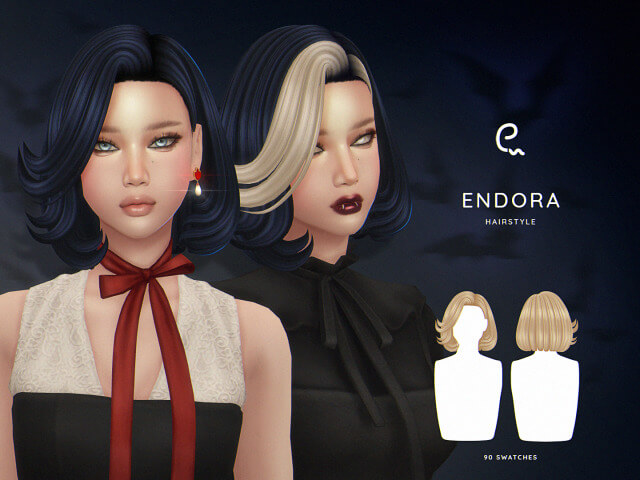
Finding a hairstyle that gives a Sim a completely different personality can make a bigger difference than you might expect. Sometimes, a new outfit is not enough to finish a character’s look, especially when you are creating a witch-inspired Sim, a mysterious townie, or a character with a darker aesthetic. That is where custom hairstyles become particularly useful. The EnriqueS4 Endora Hairstyle CC for The Sims 4 is an option worth exploring if you enjoy experimenting with distinctive hair designs and building characters with a little extra personality.
The Endora Hairstyle comes from EnriqueS4 and features a custom mesh, 90 swatches, hat compatibility, and support for Sims from Teen through Elder. It is also compatible with the base game, which makes it accessible to players who do not own every expansion pack. Another useful detail is its compatibility with Clay Candy Addons, along with the inclusion of colors from the creator’s Clay Candy palette.
With Halloween-inspired styling suggested by its pumpkin emoji and the hairstyle’s name, this CC could be an interesting addition to a spooky CAS collection. However, you do not have to limit it to October. Depending on the hairstyle’s appearance and the swatch you select, it may also suit fantasy characters, alternative fashion looks, or Sims who need something different from the hairstyles available in the standard game.
Here is a closer look at the Endora Hairstyle’s features, what its technical specifications mean, and how you could use it in your Sims 4 wardrobe.
What Is the EnriqueS4 Endora Hairstyle CC?
The EnriqueS4 Endora Hairstyle is a custom-content hair option for The Sims 4. Unlike recolors that simply change the colors of an existing hairstyle, this download is listed as a New Mesh, meaning it uses a custom-created 3D hair model.
That distinction matters when you are browsing CC. A new mesh can introduce a silhouette or overall shape that is different from the hairstyles already available in the game. For players who regularly create Sims in Create-a-Sim (CAS), custom meshes are one way to expand the range of visual styles available for their characters.
The Endora Hairstyle also comes with an extensive selection of colors. Its 90 swatches consist of 24 EA swatches and 66 colors from the creator’s Clay Candy palette. This gives players a substantial range of options when choosing a look for an individual Sim.
The listing also confirms that the hairstyle is hat-compatible, supports all listed levels of detail (LODs), and works for Sims from Teen to Elder.
These features make it worth considering for players who want a hairstyle with a wide color selection and support for different age groups.
90 Swatches: A Wide Range of Hair Color Options
One of the most notable features of the Endora Hairstyle is its total of 90 swatches.
For anyone who spends a lot of time in CAS, hair color can be an important part of a Sim’s identity. A character’s hairstyle might be perfect, but the available color options can determine whether it works with their skin details, makeup, clothing, and overall aesthetic.
The Endora Hairstyle addresses that choice by offering two groups of colors.
24 EA Swatches
The first group contains 24 EA swatches. These are the game’s familiar color options, giving players a selection of standard hair colors to work with.
This can be useful if you prefer creating Sims who fit naturally into the general appearance of the base game. You might want a hairstyle that looks appropriate for an everyday character rather than one designed around an unusually colorful aesthetic.
The EA swatches also provide a starting point for players who want to use the hairstyle across multiple Sims without relying exclusively on custom color palettes.
66 Clay Candy Palette Swatches
The remaining 66 swatches come from EnriqueS4’s Clay Candy palette.
A larger palette gives you more opportunities to experiment with different character designs. If you enjoy creating fantasy Sims, alternative characters, colorful townies, or coordinated CAS collections, additional hair colors can help you build a more varied cast.
The creator also lists compatibility with Clay Candy Addons, which is a useful detail for players who already use that collection of custom content.
However, the exact colors and their appearance should be checked in the creator’s original preview images. The swatch count alone does not establish which individual shades are included or how they look in different lighting.
Why Swatch Variety Matters
Having 90 swatches does not automatically make a hairstyle better than one with fewer colors. The real advantage is flexibility.
You could use the hairstyle for several Sims and choose different colors for each character. One Sim might have a conventional hair color, while another could use a shade from the Clay Candy palette to create a more distinctive appearance.
This is especially useful for legacy players, rotational households, and storytellers who want their characters to look different without downloading a separate hairstyle for every Sim.
It is also worth remembering that a large number of swatches can make CAS browsing more time-consuming. If you already have a sizable custom-content collection, organizing your favorite hairstyles and palettes can make character creation easier.
New Mesh: What Does It Mean for Your Sims?
The Endora Hairstyle is listed as a new mesh, which means the creator has supplied a custom hair model rather than only recoloring an existing in-game hairstyle.
Custom hair meshes can expand the visual possibilities available in The Sims 4. Different silhouettes, shapes, and styling details can help distinguish one character from another, even when their clothing and accessories are relatively simple.
For players who enjoy creating recognizable characters, that additional variety can be useful. A hairstyle can contribute to a Sim’s personality before you have even selected their traits or written their backstory.
For example, you could start with the Endora Hairstyle when creating a mysterious character for a supernatural storyline, then build the rest of the outfit around the hair’s appearance. Alternatively, you could use it for a themed makeover or a character whose style is intentionally different from the usual townie aesthetic.
The provided specifications do not describe the exact length, shape, texture, or styling of the Endora Hairstyle. For those visual details, the creator’s screenshots are the best reference.
Hat Compatible: An Important CAS Feature
Another useful feature is hat compatibility.
Some custom hairstyles can be difficult to combine with hats because the hair model may clip through the accessory or appear incorrectly when a Sim wears headwear. A hairstyle marked as hat-compatible is designed to support use with compatible hats.
This can give you more flexibility when creating different outfits for the same Sim.
For example, you might want one everyday outfit without a hat and another outfit featuring a suitable accessory. If the hairstyle supports that combination, you have more opportunities to vary the character’s appearance without changing their hair.
Hat compatibility does not necessarily guarantee that every hat in the game will fit perfectly. Different accessories can interact differently with custom hair meshes, so it is sensible to check the result in CAS before using the combination in screenshots or gameplay.
Still, the inclusion of this feature is worth noting if hats and other headwear are a regular part of your Sims’ wardrobes.
Base Game Compatible: Do You Need Expansion Packs?
The Endora Hairstyle is listed as Base Game Compatible, meaning the creator identifies it as usable without requiring a particular expansion pack.
This is helpful for players who own only the base game or have a smaller collection of additional content. You can expand your CAS options without necessarily purchasing a separate pack just to access the hairstyle.
Base game compatibility also makes the hairstyle potentially useful when creating Sims intended to be shared with other players who have different collections of DLC.
However, base game compatibility does not mean that every custom-content file is guaranteed to work perfectly with every game version. Updates can sometimes affect custom content, so checking the creator’s latest notes is a sensible step before installing a new download.
If you already use other hair CC, you can also test the Endora Hairstyle alongside your existing collection to make sure it appears correctly in CAS.
All LODs: What Players Should Know
The listing confirms that the Endora Hairstyle includes all LODs.
LOD stands for Level of Detail. In games, different levels of detail allow an object or model to use different amounts of visual complexity depending on the viewing distance or rendering situation.
For custom content, LOD support is a useful technical specification because it indicates that the creator has included the listed levels of detail for the model.
This matters most when considering how custom content is prepared for use in the game. A hairstyle may look detailed in a close-up CAS screenshot, but its model also needs to be handled appropriately when viewed under different conditions.
That said, the phrase “All LODs” does not establish a specific frame-rate improvement or guarantee that the hairstyle will have no performance impact. Actual performance depends on several factors, including the computer, the size of the Mods folder, and the amount of custom content used in a particular household.
If you use many custom hairstyles, it is still worth keeping your Mods folder organized and testing new additions if you experience unexpected visual issues.
Teen to Elder: Which Sims Can Wear It?
The Endora Hairstyle is listed for Sims from Teen through Elder.
That means its stated age range includes:
- Teen Sims
- Young Adult Sims
- Adult Sims
- Elder Sims
This range is useful if you like maintaining a consistent visual style across different generations of a household.
For example, a family in a legacy save might have several characters with different ages, and you may want to use a similar hairstyle across more than one generation. The available age range gives you the option to consider it for those characters without restricting it to a single life stage.
It can also be useful for rotational gameplay, where you regularly switch between households and create different characters with distinct backgrounds.
The listing does not mention support for infants, toddlers, children, or babies, so you should not assume that the hairstyle is available for those age groups.
How to Style the Endora Hairstyle in The Sims 4
The best way to use a custom hairstyle is to build an outfit around the character you want to create. Since the Endora Hairstyle is presented with a Halloween-themed identity, one possible direction is a supernatural or spooky look.
However, its potential use does not need to stop there.
Create a Halloween-Inspired Sim
If you enjoy seasonal gameplay, the hairstyle could be worth exploring for a Halloween makeover or a spooky household.
Try combining the hair with an outfit that matches the character’s theme. Dark clothing, dramatic makeup, and carefully selected accessories can help establish a supernatural aesthetic, depending on the hairstyle’s actual appearance.
You could also use it when creating a character for a themed party, a supernatural storyline, or a spooky screenshot series.
Experiment With Alternative Fashion
If your Sims have alternative or expressive personal styles, the large color palette offers room for experimentation.
Choose a swatch that complements your Sim’s outfit, then use accessories and makeup to create a coherent appearance. You do not need to make every element colorful or dramatic. Sometimes a distinctive hairstyle works best when the rest of the outfit is relatively simple.
Build a Consistent Character Wardrobe
Because the hairstyle is listed as compatible with Teens through Elders, you could consider it when creating multiple age-appropriate outfits for a character or family.
Try different clothing combinations while keeping the hairstyle consistent. This can help maintain a recognizable appearance across everyday, formal, and themed outfits.
Before finalizing your choices, test the hair with your preferred hats and accessories to check for any visual conflicts.
Is the EnriqueS4 Endora Hairstyle CC Worth Downloading?
If you are looking for a custom hairstyle with a large color selection, base game compatibility, and support for multiple age groups, the Endora Hairstyle has several useful features.
Its 90 swatches give you a substantial range of color options, while the custom mesh provides an additional hairstyle to consider for your Sims. Hat compatibility adds flexibility for outfit creation, and the listed LOD support is a useful technical detail.
Compatibility with Clay Candy Addons may also make it more appealing if you already use that palette or related custom content.
The main thing to consider is whether the hairstyle’s actual design matches your personal taste. Technical features can make a download more convenient, but the visual result is still the most important factor when choosing hair CC.
Check the creator’s original images to see the silhouette, texture, and available colors before downloading. You should also review the creator’s installation instructions and any compatibility notes.
The provided information does not specify the file size, exact hairstyle shape, required dependencies beyond the stated compatibility information, or a direct download link. Those details should be verified through the original creator rather than guessed.
Final Thoughts
The EnriqueS4 Endora Hairstyle CC for The Sims 4 is worth considering if you want to expand your hairstyle collection with a custom mesh and a wide range of colors.
Its main features include 90 swatches, compatibility with hats, support for Sims from Teen through Elder, base game compatibility, all LODs, and compatibility with Clay Candy Addons. Together, these specifications make it a flexible option to investigate for players who enjoy detailed CAS styling.
Whether you are creating a Halloween-inspired character, experimenting with alternative fashion, or simply looking for more hair color options, the Endora Hairstyle could be a useful addition to your Mods folder.
As with any custom content, review the creator’s previews and installation instructions before downloading. That will help you determine whether the hairstyle suits your Sims and whether it fits your current setup.
To add more cc to your game
Credit : sims4ccworld