
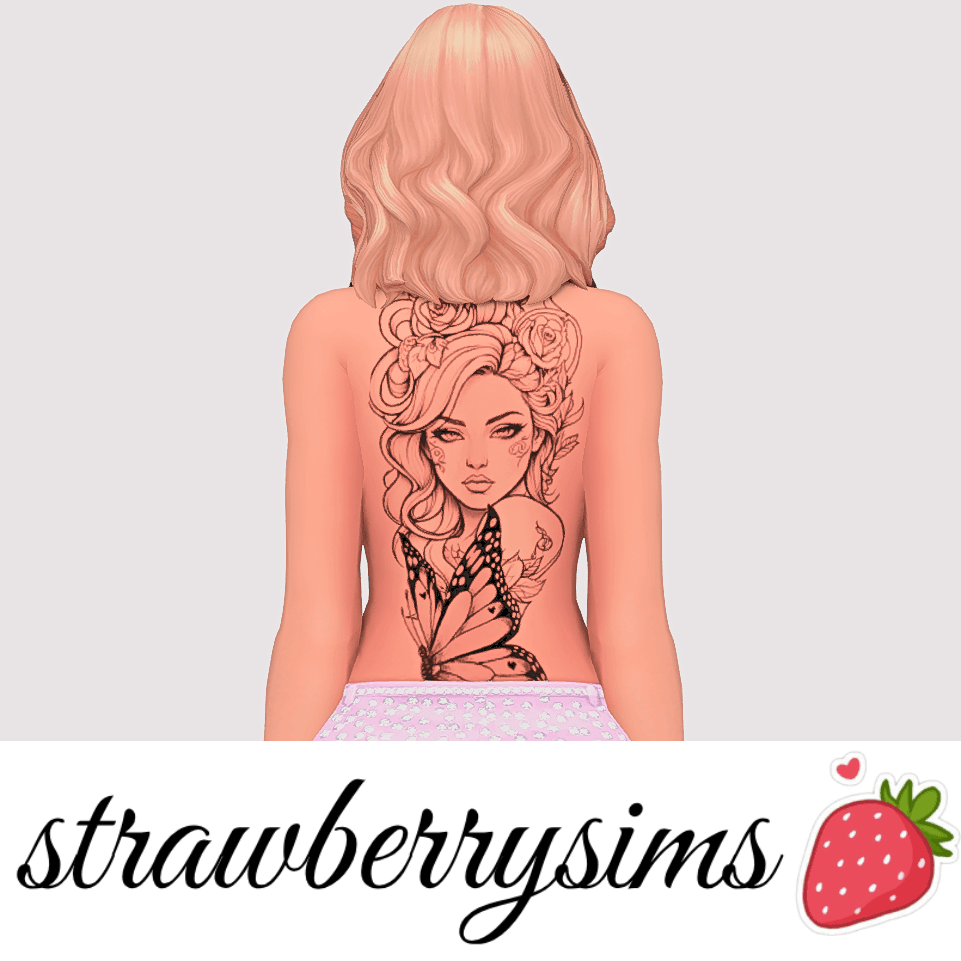
Exploring the Pretty Woman Tattoo in The Sims 4
Fine-line floral body ink, delicate script lettering, and minimalist feminine tattoos bring intimate storytelling nuances to character design in The Sims 4. While the official catalog provides a selection of standard tattoos, many feature heavy tribal bands or faded blurry textures that overpower subtle, delicate character aesthetics. The Pretty Woman Tattoo arrives as a refined fine-line body art creation designed for Sims across Teen, Young Adult, Adult, and Elder life stages. Available through CurseForge, this elegant tattoo introduces poetic beauty and handcrafted ink artistry into The Sims 4 custom content body mod collections.
The design features graceful floral stems, soft cursive typography, and delicate stippling that contours naturally along the collarbone and forearm, creating an understated artistic statement.
Because the tattoo is fully base game compatible, players do not need specific DLC packs to adorn their Sims in this delicate custom ink.
Texture Quality, Linework Precision, and Skin Blending
The craftsmanship behind the Pretty Woman Tattoo showcases meticulous attention to digital linework and alpha transparency.
The creator authored high-resolution texture maps with delicate ink fading along the edges, simulating the natural settle of healed black ink beneath the skin rather than a harsh sticker slapped on top. The fine lines retain crisp sharpness across varied camera zoom distances.
Flawless Adaptation Across Skin Tones
The tattoo utilizes balanced alpha blending that ensures clear readability on deep melanin tones, warm olive complexions, and fair porcelain skin alike. The black ink remains rich without turning muddy or unnaturally greyish in live gameplay.
Seamless Integration with Clothing and Sliders
Placed thoughtfully along the upper body, the tattoo peeks out enchantingly beneath off-the-shoulder tops, swimwear, and evening gowns without stretching awkwardly when adjusting body weight and muscle sliders in CAS.
In-Game Lighting and Live Mode Clarity
Body ink assets must interact naturally with game lighting without losing linework definition.
Consistent Contrast in Shifting Sunlight
Under bright tropical midday sun in Sulani or dim candlelight in Tartosa restaurants, the fine-line tattoo maintains clear readability. It does not produce weird specular reflections or pixelated blurring during animated conversational gestures.
Aging and Legacy Continuity
Because the tattoo is enabled across life stages from Teen to Elder, characters can carry their meaningful ink throughout their life journey, preserving personal history and aesthetic identity across multiple generations.
Storytelling Ideas for Artistic and Free-Spirited Sims
The poetic nature of the Pretty Woman Tattoo inspires diverse character backgrounds.
San Myshuno Creative Bohemians
Outfit indie painters, boutique baristas, and acoustic musicians in delicate floral tattoos that reflect their artistic passions and free-spirited lifestyle.
Romantic Memories and Personal Milestones
Commemorate meaningful life milestones, whirlwind summer romances, or personal growth journeys with a delicate tattoo that tells an intimate personal story.
Festival Fashion and Warm-Weather Styling
In warm worlds like Sulani or Oasis Springs, pair this delicate body ink with floral swimwear, linen sundresses, and boho jewelry to create effortless, sun-drenched character photography.
Installation Guidelines for Your Mods Folder
To install the Pretty Woman Tattoo, download the package file and place it into your Documents\Electronic Arts\The Sims 4\Mods folder. Ensure custom content is toggled active in your game options. The tattoo appears under the Tattoos category in CAS.
Skin Blending and CAS Slider Interaction
Skin details and overlays must cooperate with the underlying character geometry rather than fighting against it. One of the greatest strengths of a well-crafted skin overlay is how smoothly it adapts to custom facial presets and the game’s built-in body sliders.
When adjusting cheekbone width, jawline depth, nose curvature, or eye tilt in Create-a-Sim, the overlay stretches and compresses proportionally with the underlying facial mesh. It does not cause jagged distortion around the mouth or nose bridge, allowing you to sculpt unique character faces while retaining crisp dermal definition.
The overlay also blends harmoniously with body sliders, whether your Sim has a slender build, muscular athletic definition, or a softer, full-figured frame. The shading along the collarbones, ribs, and midsection scales naturally, enhancing the character’s physical shape without imposing unnatural, painted-on proportions.
Layering with Makeup and Facial Accessories
Character creators often like to layer multiple details—such as custom freckles, blush, eyeliner, and piercings—to give their Sims distinct personal flair. A high-quality skin overlay acts as an ideal primer, providing a clean, subtle foundation that enhances rather than clashes with cosmetic accessories.
Because the overlay avoids overly aggressive default makeup shading, custom lipsticks and eyeshadows apply with true color fidelity. You do not get weird color bleeding or muddy edge artifacts around the lips or eyes. This compatibility makes it an essential tool for players who enjoy creating detailed character portraits and documenting subtle visual changes as characters age.
Aging Up and Generational Skin Continuity
In generational gameplay, preserving a Sim’s facial identity as they age from teen to elder is essential for emotional attachment. Because this skin detail is enabled across life stages, characters maintain their distinctive facial structure throughout their life journey.
When young adults transition into mature adults and elders, the overlay layers naturally beneath EA wrinkles and age lines. It preserves character likeness without erasing the natural signs of aging, providing a dignified, believable progression that enriches legacy storytelling.
Skin Tone Vibrancy Across Lighting Conditions
Lighting engines in The Sims 4 can dramatically alter cosmetic and skin appearances. High quality skin details and makeup sets must preserve balanced undertones across noon daylight, dim indoor lamps, and nightlife club neon without turning greyish or overly saturated.
Under bright sunlight in worlds like Oasis Springs, the skin details reflect subtle highlights that accent cheekbones and facial contours naturally. Indoors under tungsten lamps, the warm tones remain vibrant, giving Sims a healthy, lively appearance across all environments.
Close-Up Screenshot Art and CAS Photography
For storytellers and virtual photographers who share character stories on social media, skin textures undergo intense scrutiny during tight close-up camera angles. Clean alpha transparency and crisp resolution ensure that edges around eyelids, lips, and nostrils stay smooth.
There are no pixelated artifacts or blurred textures when zooming in for emotional conversational portraits, making this cosmetic package an invaluable asset for creative story albums and family legacy documentation.