
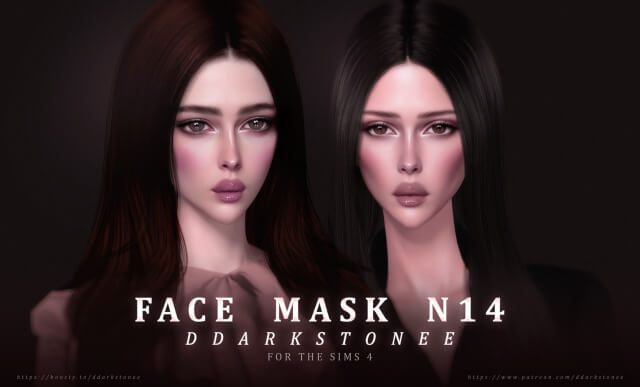
Exploring Face Mask N14 in The Sims 4
Realistic skin details, nuanced facial contouring, and delicate pore textures transform standard character faces in The Sims 4 into expressive, lifelike portraits. While EA’s vanilla skin textures provide a clean cartoon baseline, they frequently lack the subtle anatomic shading along cheekbones, nose bridges, and eye sockets that make characters feel truly human. Face Mask N14 arrives as an exceptionally refined face overlay created for Sims across Teen, Young Adult, Adult, and Elder life stages. Shared via sims4ccworld, this skin detail introduces natural realism and soft dermal radiance into The Sims 4 custom content beauty and genetics options.
The overlay introduces soft under-eye shading, subtle nasolabial depth, realistic lip creases, and refined nose bridge highlights that enhance facial depth without overpowering natural character features.
Because the detail is base game compatible, players do not need specific DLC packs to elevate their Sims’ facial realism with this skin mask.
Texture Quality, Skin Blending, and Anatomic Realism
The craftsmanship behind Face Mask N14 demonstrates exceptional artistic restraint and technical mastery.
The creator authored high-resolution texture maps with delicate alpha transparency gradients that blend seamlessly across all standard and custom skin tones. Rather than imposing a rigid face onto your Sim, the mask adapts smoothly to underlying facial sliders and presets.
Subtle Pores and Highlight Shading
The mask features ultra-fine micro-pore textures and soft directional highlights along the cheekbones and forehead. Under close-up inspection, the skin appears healthy, hydrated, and dimensional rather than flat or plastic.
Harmonious Layering with Cosmetics
Because the overlay provides a neutral anatomic foundation, it layers cleanly beneath custom blushes, eyeliners, lipsticks, and freckles without muddy discoloration or strange alpha halo artifacts around the eyes and mouth.
In-Game Lighting and CAS Slider Interaction
Skin overlays must maintain visual fidelity across dynamic game lighting and diverse facial morphs.
Lighting Balance Across In-Game Worlds
Under bright desert sun in Oasis Springs or moody overcast skies in Brindleton Bay, the facial shading preserves balanced tonal depth. The skin details never appear washed out or overly dark during live conversational gameplay.
Aging and Generational Continuity
Enabled across life stages from Teen through Elder, Face Mask N14 layers naturally beneath EA age wrinkles, allowing legacy characters to age with dignity while maintaining their signature facial character throughout generations.
Storytelling Ideas for Lifelike Sim Characters
The natural realism of Face Mask N14 enhances emotional resonance across all gameplay styles.
Expressive Legacy Portraits
Capture emotionally resonant close-up portraits of your legacy heirs as they experience first romances, university graduations, and major life milestones with lifelike facial depth.
Everyday Character Authenticity
Give townies and active household members grounded, believable facial features that make ordinary domestic moments feel rich, engaging, and authentic.
Dramatic Cinema and Storytelling Albums
For players producing web series or visual storytelling blogs, this facial mask provides the photographic depth needed to convey nuanced emotional expression during dramatic dialogue scenes.
Installation Guidelines for Your Mods Folder
To install Face Mask N14, place the package file into your Documents\Electronic Arts\The Sims 4\Mods directory. Ensure custom content is toggled on in your game options. The overlay appears under Skin Details (Forehead or Cheek Details) in CAS.
Skin Blending and CAS Slider Interaction
Skin details and overlays must cooperate with the underlying character geometry rather than fighting against it. One of the greatest strengths of a well-crafted skin overlay is how smoothly it adapts to custom facial presets and the game’s built-in body sliders.
When adjusting cheekbone width, jawline depth, nose curvature, or eye tilt in Create-a-Sim, the overlay stretches and compresses proportionally with the underlying facial mesh. It does not cause jagged distortion around the mouth or nose bridge, allowing you to sculpt unique character faces while retaining crisp dermal definition.
The overlay also blends harmoniously with body sliders, whether your Sim has a slender build, muscular athletic definition, or a softer, full-figured frame. The shading along the collarbones, ribs, and midsection scales naturally, enhancing the character’s physical shape without imposing unnatural, painted-on proportions.
Layering with Makeup and Facial Accessories
Character creators often like to layer multiple details—such as custom freckles, blush, eyeliner, and piercings—to give their Sims distinct personal flair. A high-quality skin overlay acts as an ideal primer, providing a clean, subtle foundation that enhances rather than clashes with cosmetic accessories.
Because the overlay avoids overly aggressive default makeup shading, custom lipsticks and eyeshadows apply with true color fidelity. You do not get weird color bleeding or muddy edge artifacts around the lips or eyes. This compatibility makes it an essential tool for players who enjoy creating detailed character portraits and documenting subtle visual changes as characters age.
Aging Up and Generational Skin Continuity
In generational gameplay, preserving a Sim’s facial identity as they age from teen to elder is essential for emotional attachment. Because this skin detail is enabled across life stages, characters maintain their distinctive facial structure throughout their life journey.
When young adults transition into mature adults and elders, the overlay layers naturally beneath EA wrinkles and age lines. It preserves character likeness without erasing the natural signs of aging, providing a dignified, believable progression that enriches legacy storytelling.
Skin Tone Vibrancy Across Lighting Conditions
Lighting engines in The Sims 4 can dramatically alter cosmetic and skin appearances. High quality skin details and makeup sets must preserve balanced undertones across noon daylight, dim indoor lamps, and nightlife club neon without turning greyish or overly saturated.
Under bright sunlight in worlds like Oasis Springs, the skin details reflect subtle highlights that accent cheekbones and facial contours naturally. Indoors under tungsten lamps, the warm tones remain vibrant, giving Sims a healthy, lively appearance across all environments.
Close-Up Screenshot Art and CAS Photography
For storytellers and virtual photographers who share character stories on social media, skin textures undergo intense scrutiny during tight close-up camera angles. Clean alpha transparency and crisp resolution ensure that edges around eyelids, lips, and nostrils stay smooth.
There are no pixelated artifacts or blurred textures when zooming in for emotional conversational portraits, making this cosmetic package an invaluable asset for creative story albums and family legacy documentation.